要匯入一份節列表,它們必須採用與您儲存 .txt 檔案時所見的相同格式(您必須從下拉選單中選擇此選項)。該格式相當基礎。
.ref 檔案透過檔案底部的資訊與專案連結。然而,.txt 檔案並未連結。如果您在一個專案/資源/slt 中建立列表並將其儲存為 .txt,那麼當您開啟該列表時,該列表將不會連結到特定專案,而是連結到節。
請注意,使用 .txt 列表時,單字不會被高亮顯示。如果您希望使用儲存的列表高亮顯示單字,則必須將其儲存為 .ref 類型。
正如 mnjames 所指出的 - 您可以使用結果列表選項來建立更複雜的搜尋。
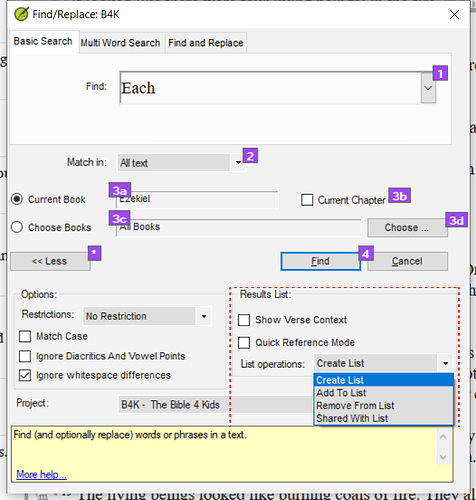
Screenshot 2022-01-20 08.03.17659×691 100 KB
To import a list of verses they should be in the same format that you find when you save a .txt file (you must select this from the dropdown). The format is pretty basic.
The .ref files are linked to a project by the information at the bottom of the file. However, the .txt files are not linked. If you create a list in one project/resource/slt and save the list as a .txt then when you open that list, the list will not be linked to a particular project, but to the verses.
Note that with .txt lists the word does not get highlighted. If you want to highlight a word with a saved list then it must be saved as a .ref type.
As mnjames has pointed out - you can use the results list options to create more complex searches.
Screenshot 2022-01-20 08.03.17659×691 100 KB
機器翻譯自 English








