Para importar uma lista de versículos, eles devem estar no mesmo formato que você encontra ao salvar um arquivo .txt (você deve selecionar isso no menu suspenso). O formato é bastante básico.
Os arquivos .ref são vinculados a um projeto pelas informações na parte inferior do arquivo. No entanto, os arquivos .txt não são vinculados. Se você criar uma lista em um projeto/recurso/slt e salvar a lista como .txt, então, ao abrir essa lista, ela não estará vinculada a um projeto específico, mas aos versículos.
Observe que, com listas .txt, a palavra não é destacada. Se você quiser destacar uma palavra com uma lista salva, ela deve ser salva como tipo .ref.
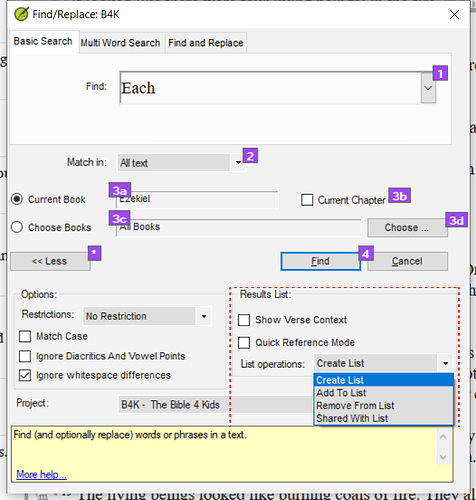
Como o mnjames apontou - você pode usar as opções da lista de resultados para criar buscas mais complexas.
Screenshot 2022-01-20 08.03.17659×691 100 KB
To import a list of verses they should be in the same format that you find when you save a .txt file (you must select this from the dropdown). The format is pretty basic.
The .ref files are linked to a project by the information at the bottom of the file. However, the .txt files are not linked. If you create a list in one project/resource/slt and save the list as a .txt then when you open that list, the list will not be linked to a particular project, but to the verses.
Note that with .txt lists the word does not get highlighted. If you want to highlight a word with a saved list then it must be saved as a .ref type.
As mnjames has pointed out - you can use the results list options to create more complex searches.
Screenshot 2022-01-20 08.03.17659×691 100 KB








