श्लोकों की सूची आयात करने के लिए, उन्हें उसी प्रारूप में होना चाहिए जो आपको तब मिलता है जब आप एक .txt फ़ाइल सेव करते हैं (आपको ड्रॉपडाउन से यह चुनना होगा)। प्रारूप बहुत बुनियादी है।
.ref फ़ाइलें फ़ाइल के निचले हिस्से में दी गई जानकारी के माध्यम से एक प्रोजेक्ट से जुड़ी होती हैं। हालाँकि, .txt फ़ाइलें जुड़ी नहीं होती हैं। यदि आप एक प्रोजेक्ट/संसाधन/slt में एक सूची बनाते हैं और सूची को .txt के रूप में सेव करते हैं, तो जब आप उस सूची को खोलते हैं, तो सूची किसी विशेष प्रोजेक्ट से नहीं, बल्कि श्लोकों से जुड़ी होगी।
ध्यान दें कि .txt सूचियों में शब्द हाइलाइट नहीं होता है। यदि आप एक सेव की गई सूची के साथ किसी शब्द को हाइलाइट करना चाहते हैं, तो इसे .ref प्रकार के रूप में सेव किया जाना चाहिए।
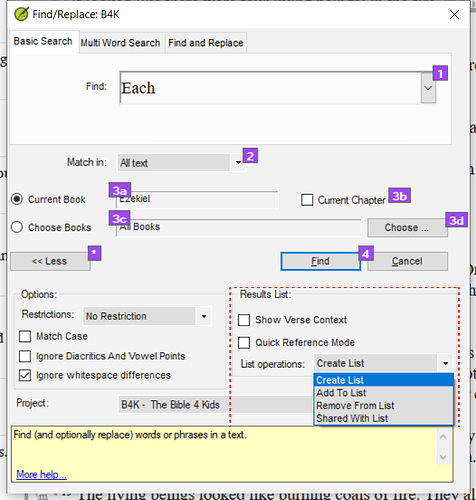
जैसा कि mnjames ने उल्लेख किया है - आप अधिक जटिल खोजें बनाने के लिए परिणाम सूची विकल्पों का उपयोग कर सकते हैं।
Screenshot 2022-01-20 08.03.17659×691 100 KB
To import a list of verses they should be in the same format that you find when you save a .txt file (you must select this from the dropdown). The format is pretty basic.
The .ref files are linked to a project by the information at the bottom of the file. However, the .txt files are not linked. If you create a list in one project/resource/slt and save the list as a .txt then when you open that list, the list will not be linked to a particular project, but to the verses.
Note that with .txt lists the word does not get highlighted. If you want to highlight a word with a saved list then it must be saved as a .ref type.
As mnjames has pointed out - you can use the results list options to create more complex searches.
Screenshot 2022-01-20 08.03.17659×691 100 KB
English से मशीन-अनुवादित








