要导入经文列表,它们应采用与保存 .txt 文件时找到的相同格式(你必须从下拉菜单中选择此项)。该格式相当基础。
.ref 文件通过文件底部的信息与项目关联。然而,.txt 文件不关联。如果你在一个项目/资源/slt 中创建一个列表并将列表保存为 .txt,那么当你打开该列表时,该列表不会与特定项目关联,而是与经文关联。
请注意,对于 .txt 列表,单词不会被高亮显示。如果你想在保存的列表中高亮显示单词,则必须将其保存为 .ref 类型。
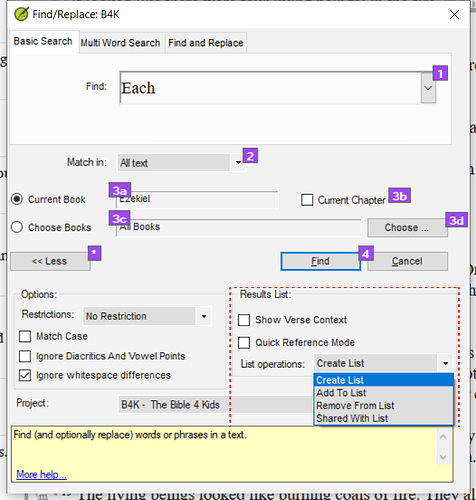
正如 mnjames 所指出的 - 你可以使用结果列表选项来创建更复杂的搜索。
Screenshot 2022-01-20 08.03.17659×691 100 KB
To import a list of verses they should be in the same format that you find when you save a .txt file (you must select this from the dropdown). The format is pretty basic.
The .ref files are linked to a project by the information at the bottom of the file. However, the .txt files are not linked. If you create a list in one project/resource/slt and save the list as a .txt then when you open that list, the list will not be linked to a particular project, but to the verses.
Note that with .txt lists the word does not get highlighted. If you want to highlight a word with a saved list then it must be saved as a .ref type.
As mnjames has pointed out - you can use the results list options to create more complex searches.
Screenshot 2022-01-20 08.03.17659×691 100 KB
机器翻译自 English








