Para importar una lista de versículos, deben estar en el mismo formato que el que encuentra al guardar un archivo .txt (debe seleccionar esto desde el menú desplegable). El formato es bastante básico.
Los archivos .ref están vinculados a un proyecto mediante la información en la parte inferior del archivo. Sin embargo, los archivos .txt no están vinculados. Si crea una lista en un proyecto/recurso/slt y guarda la lista como .txt, entonces al abrir esa lista, la lista no estará vinculada a un proyecto en particular, sino a los versículos.
Tenga en cuenta que con las listas .txt la palabra no se resalta. Si desea resaltar una palabra con una lista guardada, debe guardarse como tipo .ref.
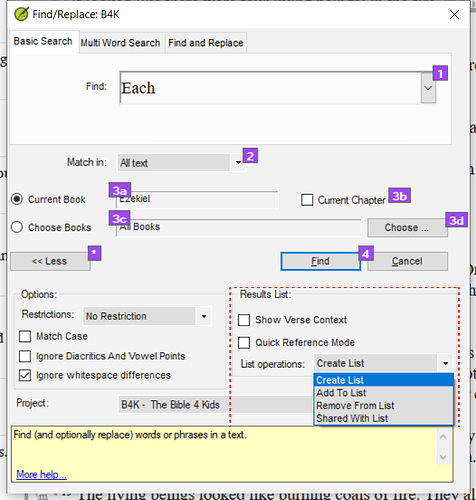
Como señaló mnjames, puede usar las opciones de la lista de resultados para crear búsquedas más complejas.
Captura de pantalla 2022-01-20 08.03.17659×691 100 KB
To import a list of verses they should be in the same format that you find when you save a .txt file (you must select this from the dropdown). The format is pretty basic.
The .ref files are linked to a project by the information at the bottom of the file. However, the .txt files are not linked. If you create a list in one project/resource/slt and save the list as a .txt then when you open that list, the list will not be linked to a particular project, but to the verses.
Note that with .txt lists the word does not get highlighted. If you want to highlight a word with a saved list then it must be saved as a .ref type.
As mnjames has pointed out - you can use the results list options to create more complex searches.
Screenshot 2022-01-20 08.03.17659×691 100 KB
Traducción automática desde English








