我没有你的数据,无法完全理解你的问题。在单词过滤器中输入“naha”应该会找到所有以“naha”开头的单词。有一个设置可以查找单词末尾的内容。
转到单词列表(Wordlist)菜单 Sort by → End of word
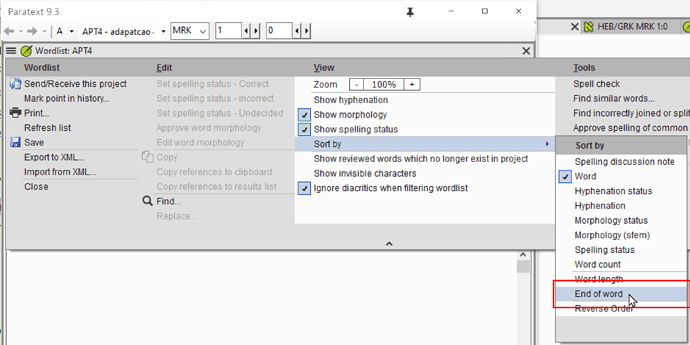
image2816×1409 113 KB
然后在单词过滤器中输入你要查找的字符串。(我将使用“aga”作为此数据的示例。)
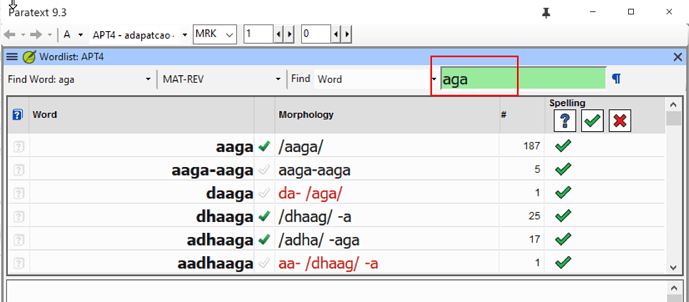
image2480×1087 80.1 KB
为了获得更多控制,你必须使用普通的查找(Find)功能进行搜索,然后你可以指定“Beginning of the word”(单词开头)、“End of the word”(单词结尾)和“ignore diacritics”(忽略变音符号)。你必须跳转到经文才能进行任何更改,但你只能看到以“naha”开头或结尾的单词。要对最终列表进行更精细的控制,你必须使用 RegexPal。
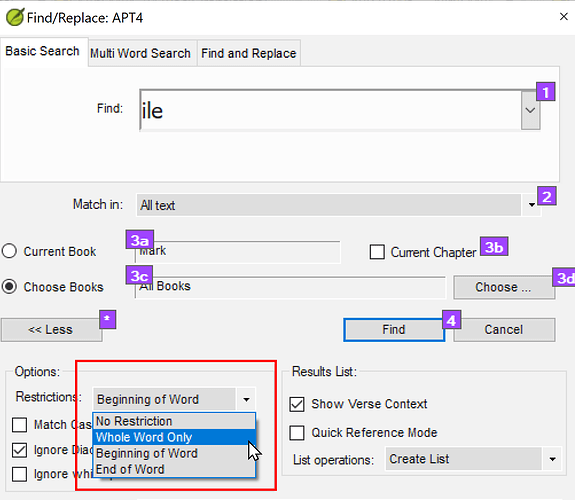
image1507×1309 38.1 KB
不幸的是,查找(Find)功能强大的搜索特性并没有包含在单词列表(Wordlist)工具中。这可能是一个很好的功能请求。
I do not have your data to fully understand your problem. Typing “naha” in the word filter should find all the words that begin with “naha”. There is a setting to find something at the end of words.
Go to the Wordlist menu Sort by → End of word
image2816×1409 113 KB
Then type the character string you are looking for in the word filter. (I will use “aga”) for this data.
image2480×1087 80.1 KB
To have more control you will have to search using the normal Find function, then you can specify “Beginning of the word”, “End of the word” and “ignore diacritics”. you will have to jump to the verse to make any changes, but you would be able to see only words with “naha” at the beginning or the end of words. For even more control over the final list you would have to use RegexPal.
image1507×1309 38.1 KB
Unfortunately, the powerful searching features of Find are not also in the Wordlist tool. Might be a good feature request.
机器翻译自 English








