Здравствуйте.
Скорее всего, вы скоро получите ответ на ваш отчет, но, возможно, вы можете проверить следующее (будьте осторожны и делайте это только в том случае, если вы отвечаете за поддержку команды):
В папке проектов Paratext (либо C:\My Paratext 9 Projects, либо C:\My Paratext 8 Projects) найдите папку проекта xxx и перейдите в нее.
Там вы найдете несколько файлов, начинающихся с «Notes» и за которыми следует имя пользователя. Например, «Notes_John Smith.xml». Найдите имя консультанта и посмотрите, есть ли два файла с одинаковым именем. Если да, вы увидите, что единственное различие — это «.BAK» в конце:
Notes_John Smith.xml
Notes_John Smith.xml.BAK
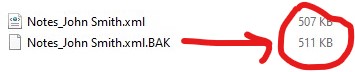
Обратите внимание на размер файлов. Если файл .xml.BAK больше, чем файл .xml, вероятно, заметки можно восстановить.
Только если файл .BAK больше, действуйте следующим образом:
-
Закройте Paratext
-
Обязательно сохраните копии этих двух файлов перед продолжением.
-
После этого вам нужно переименовать файлы. Наша цель — чтобы файл .xml.BAK стал .xml:
Один из вариантов — переименовать Notes_John Smith.xml в Notes_John Smith.xml.BAK2. Затем переименуйте Notes_John Smith.xml.BAK в Notes_John Smith.xml.
Теперь файл с наибольшим размером — это Notes_John Smith.xml:
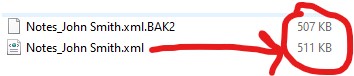
- Откройте Paratext и проверьте, есть ли у вас заметки.
Копия, которую вы сделали ранее, пригодится для отката этого процесса в случае ошибки или для сотрудников Paratext, если они попросят вас это сделать.
Hola.
You will probably get an answer soon to the report you made, but maybe you can check the following (be careful and only if you are the one in charge of supporting the team):
In the Paratext projects folder (either C:\My Paratext 9 Projects or C:\My Paratext 8 Projects) look for the xxx project folder and enter it.
You will find several files starting with “Notes” followed by the user name. For example, “Notes_John Smith.xml”. Locate the consultant’s name and see if there are two files with the same name. If so, you will see that the only difference is the “.BAK” at the end:
Notes_John Smith.xml
Notes_John Smith.xml.BAK
Note the size of the files. If the .xml.BAK file is larger than the .xml file, it is likely that the notes can be recovered.
Only if the .BAK file is larger proceed as follows:
-
Close Paratext
-
Be sure to save a copy of these two files before proceeding.
-
Once this is done you need to rename the files. What we are looking for is for the .xml.BAK to become .xml:
One option is to rename Notes_John Smith.xml to Notes_John Smith.xml.BAK2. Then you rename Notes_John Smith.xml.BAK to Notes_John Smith.xml.
So the file with the most weight is now Notes_John Smith.xml:
- Open Paratext and check if you have the notes.
The copy you took earlier will be useful for backtracking this process in case of error or for the Paratext staff if they ask you to do so.








