0 votes
287 views

Have Consultant with problem, he says:
“I was working along checking xxx and yyy [projects for] Philippians. I was making one of my last passes through, checking key terms, when I noticed that most of the flags had the little yellow box around them. And flags that I had resolved were back in the text when they shouldn’t be showing up at all. One comment I know I had inserted earlier in the day was not there. So, it looks like somehow the database reverted back to an earlier version all on its own. And the version it’s reverted back to is probably from a week ago or more. I’m not sure why this happened, because I hadn’t done a send-receive just before it happened, as far as I know. I sent feedback to Paratext yesterday afternoon via their Help menu feature as soon as it happened, but haven’t heard back. That’s weird to me because I marked it high priority because I had lost data.” (PTXS-29194)

The Project History doesn’t show details on Notes changes. The team has done a couple S/Rs since this problem occurred. Is there any way for him to see the difference between two versions of the Notes, so that he can recreate his work that was lost?

Paratext by (1.2k points)
reshown | 287 views

3 Answers

0 votes
Best answer

Hola.
You will probably get an answer soon to the report you made, but maybe you can check the following (be careful and only if you are the one in charge of supporting the team):
In the Paratext projects folder (either C:\My Paratext 9 Projects or C:\My Paratext 8 Projects) look for the xxx project folder and enter it.

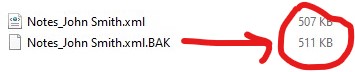
You will find several files starting with “Notes” followed by the user name. For example, “Notes_John Smith.xml”. Locate the consultant’s name and see if there are two files with the same name. If so, you will see that the only difference is the “.BAK” at the end:
Notes_John Smith.xml
Notes_John Smith.xml.BAK
notes

Note the size of the files. If the .xml.BAK file is larger than the .xml file, it is likely that the notes can be recovered.

Only if the .BAK file is larger proceed as follows:

  1. Close Paratext

  2. Be sure to save a copy of these two files before proceeding.

  3. Once this is done you need to rename the files. What we are looking for is for the .xml.BAK to become .xml:

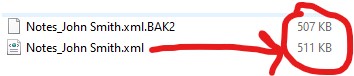
One option is to rename Notes_John Smith.xml to Notes_John Smith.xml.BAK2. Then you rename Notes_John Smith.xml.BAK to Notes_John Smith.xml.

So the file with the most weight is now Notes_John Smith.xml:
notes2

  1. Open Paratext and check if you have the notes.

The copy you took earlier will be useful for backtracking this process in case of error or for the Paratext staff if they ask you to do so.


by (967 points)
0 votes

@listentwice Did you find an answer for this?

by [Moderator]
(2.1k points)
0 votes

Yes, the end user was working with Steve White on issue via email.

“If you are willing to abandon the current project state on your laptop, you can delete the project from your Paratext, then do a send/receive and get a fresh copy of the project from the server.
Steve White”

by (1.2k points)

Related questions

0 votes
2 answers 221 views
A few years ago, I inserted around 400 notes into our consultant notes project called "Notes for Translators ... backing up is possible with consultant notes projects. Thanks!
proftroy 103 asked Jun 9, 2023
0 votes
1 answer 163 views
I change two usernames in the registry, and they both lost most of the projects in their S/R window. Went for 20+ ... I have done S/R, looked at registry, everything looks correct.
listentwice 1.2k asked Mar 13, 2023
0 votes
1 answer 201 views
I recently ran into a major problem regarding the scroll link between Ptx 8 and BART. I was editing my project ... else? Paratext developers, please look into this and correct it!
anon492507 123 asked Nov 1, 2017
0 votes
1 answer 190 views
Before migrating a PT 7.5 project to PT 8, I wanted to double-check on this. All the reviewers' and consultants' notes ... and we can't afford to lose access to them. Thank you!
anon059953 238 asked Jun 9, 2017
0 votes
4 answers 474 views
On May 4, when I did a send/receive, I got the following Conflict note on Acts 18:0: Changes made to a ... edits back into the text. What might have caused this? RickNivens
RickNivens 264 asked May 7, 2018
Welcome to Support Bible, where you can ask questions and receive answers from other members of the community.
For just as each of us has one body with many members, and these members do not all have the same function, so in Christ we, though many, form one body, and each member belongs to all the others.
Romans 12:4-5
3,037 questions
5,995 answers
5,661 comments
2,022 users




