Bonjour.
Vous recevrez probablement bientôt une réponse au rapport que vous avez fait, mais vous pouvez peut-être vérifier les éléments suivants (faites attention et seulement si vous êtes celui qui est chargé de soutenir l'équipe) :
Dans le dossier des projets Paratext (soit C:\My Paratext 9 Projects ou C:\My Paratext 8 Projects), cherchez le dossier du projet xxx et entrez-y.
Vous trouverez plusieurs fichiers commençant par « Notes » suivis du nom de l'utilisateur. Par exemple, « Notes_John Smith.xml ». Localisez le nom du consultant et voyez s'il y a deux fichiers avec le même nom. Si c'est le cas, vous verrez que la seule différence est le « .BAK » à la fin :
Notes_John Smith.xml
Notes_John Smith.xml.BAK
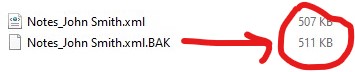
Notez la taille des fichiers. Si le fichier .xml.BAK est plus grand que le fichier .xml, il est probable que les notes puissent être récupérées.
Uniquement si le fichier .BAK est plus grand, procédez comme suit :
-
Fermez Paratext
-
Assurez-vous de sauvegarder une copie de ces deux fichiers avant de continuer.
-
Une fois cela fait, vous devez renommer les fichiers. Ce que nous cherchons, c'est que le .xml.BAK devienne .xml :
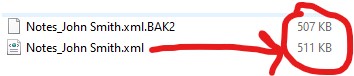
Une option est de renommer Notes_John Smith.xml en Notes_John Smith.xml.BAK2. Ensuite, vous renommez Notes_John Smith.xml.BAK en Notes_John Smith.xml.
Ainsi, le fichier le plus lourd est maintenant Notes_John Smith.xml :
- Ouvrez Paratext et vérifiez si vous avez les notes.
La copie que vous avez prise plus tôt sera utile pour revenir en arrière dans ce processus en cas d'erreur ou pour le personnel de Paratext s'ils vous le demandent.
Hola.
You will probably get an answer soon to the report you made, but maybe you can check the following (be careful and only if you are the one in charge of supporting the team):
In the Paratext projects folder (either C:\My Paratext 9 Projects or C:\My Paratext 8 Projects) look for the xxx project folder and enter it.
You will find several files starting with “Notes” followed by the user name. For example, “Notes_John Smith.xml”. Locate the consultant’s name and see if there are two files with the same name. If so, you will see that the only difference is the “.BAK” at the end:
Notes_John Smith.xml
Notes_John Smith.xml.BAK
Note the size of the files. If the .xml.BAK file is larger than the .xml file, it is likely that the notes can be recovered.
Only if the .BAK file is larger proceed as follows:
-
Close Paratext
-
Be sure to save a copy of these two files before proceeding.
-
Once this is done you need to rename the files. What we are looking for is for the .xml.BAK to become .xml:
One option is to rename Notes_John Smith.xml to Notes_John Smith.xml.BAK2. Then you rename Notes_John Smith.xml.BAK to Notes_John Smith.xml.
So the file with the most weight is now Notes_John Smith.xml:
- Open Paratext and check if you have the notes.
The copy you took earlier will be useful for backtracking this process in case of error or for the Paratext staff if they ask you to do so.
Traduit automatiquement depuis English








