Halo.
Anda mungkin akan segera mendapatkan jawaban atas laporan yang Anda buat, tetapi mungkin Anda dapat memeriksa hal berikut (bersikap hati-hati dan hanya jika Anda adalah orang yang bertanggung jawab atas dukungan tim):
Di folder proyek Paratext (baik C:\My Paratext 9 Projects atau C:\My Paratext 8 Projects), cari folder proyek xxx dan masuk ke dalamnya.
Anda akan menemukan beberapa file yang dimulai dengan “Notes” diikuti oleh nama pengguna. Misalnya, “Notes_John Smith.xml”. Temukan nama konsultan dan lihat apakah ada dua file dengan nama yang sama. Jika ya, Anda akan melihat bahwa satu-satunya perbedaan adalah “.BAK” di akhir:
Notes_John Smith.xml
Notes_John Smith.xml.BAK
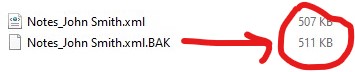
Perhatikan ukuran file. Jika file .xml.BAK lebih besar daripada file .xml, kemungkinan besar catatan dapat dipulihkan.
Hanya jika file .BAK lebih besar, lanjutkan sebagai berikut:
-
Tutup Paratext
-
Pastikan untuk menyimpan salinan kedua file ini sebelum melanjutkan.
-
Setelah ini selesai, Anda perlu mengubah nama file. Yang kami cari adalah agar .xml.BAK menjadi .xml:
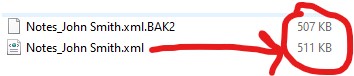
Satu opsi adalah mengubah nama Notes_John Smith.xml menjadi Notes_John Smith.xml.BAK2. Kemudian Anda mengubah nama Notes_John Smith.xml.BAK menjadi Notes_John Smith.xml.
Jadi file dengan bobot terbesar sekarang adalah Notes_John Smith.xml:
- Buka Paratext dan periksa apakah Anda memiliki catatannya.
Salinan yang Anda ambil sebelumnya akan berguna untuk melacak kembali proses ini dalam kasus kesalahan atau untuk staf Paratext jika mereka meminta Anda melakukannya.
Hola.
You will probably get an answer soon to the report you made, but maybe you can check the following (be careful and only if you are the one in charge of supporting the team):
In the Paratext projects folder (either C:\My Paratext 9 Projects or C:\My Paratext 8 Projects) look for the xxx project folder and enter it.
You will find several files starting with “Notes” followed by the user name. For example, “Notes_John Smith.xml”. Locate the consultant’s name and see if there are two files with the same name. If so, you will see that the only difference is the “.BAK” at the end:
Notes_John Smith.xml
Notes_John Smith.xml.BAK
Note the size of the files. If the .xml.BAK file is larger than the .xml file, it is likely that the notes can be recovered.
Only if the .BAK file is larger proceed as follows:
-
Close Paratext
-
Be sure to save a copy of these two files before proceeding.
-
Once this is done you need to rename the files. What we are looking for is for the .xml.BAK to become .xml:
One option is to rename Notes_John Smith.xml to Notes_John Smith.xml.BAK2. Then you rename Notes_John Smith.xml.BAK to Notes_John Smith.xml.
So the file with the most weight is now Notes_John Smith.xml:
- Open Paratext and check if you have the notes.
The copy you took earlier will be useful for backtracking this process in case of error or for the Paratext staff if they ask you to do so.
Diterjemahkan secara otomatis dari English








