這聽起來像是縮放(scaling)的問題。有兩個不同的地方可以進行調整:
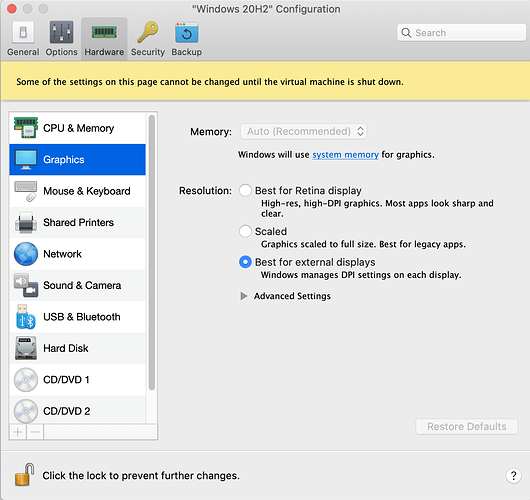
(1) 在 Parallels 中:設定…圖形…解析度。(如果機器正在運行,則為 檢視…Retina 解析度)。這裡有三個選項。在我的設定中,我看不出「縮放」、「最佳化 Retina 顯示器」或「最佳化外部顯示器」之間有什麼明顯差異,但在您的設定中,這可能會產生差異。您可能需要關閉 Windows 才能看到變更。
PastedGraphic-2.png1350×1272 191 KB
如果您對 Parallels 的設定不滿意,您可以嘗試僅更改 Paratext 的縮放選項:
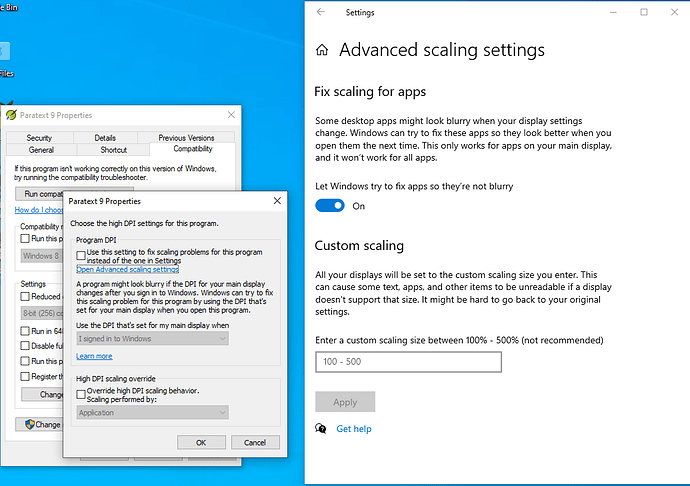
(2) 右鍵單擊 Paratext 圖示,點選 屬性…相容性…變更高 DPI 設定。我看到兩個核取方塊,在我的電腦上它們都未核取。請注意還有「開啟進階縮放設定」的連結。我認為當您在 (1) 中更改設定時,Parallels 會自動調整這些「進階縮放設定」。
PastedGraphic-1.png1035×729 68.3 KB
希望您能找到解決方案。
This sounds like a problem with scaling. There are two different places you can change things:
(1) in Parallels: Configuration…Graphics…Resolution. (If the machine is running, then View…Retina Resolution). There are three options here. On my setup I can’t really see a difference between “Scaled”, “Best for Retina display” or “Best for external displays” but for your setup maybe it would make a difference. You will probably need to shutdown Windows to see the change.
PastedGraphic-2.png1350×1272 191 KB
If you don’t get satisfaction with the Parallels settings, you might have success with changing the scaling options for just Paratext:
(2) Right-click on the Paratext icon, click Properties…Compatibility…Change high DPI settings. I see two checkboxes and they’re both unchecked on my computer. Note also the link to “Open Advanced scaling settings.” I think these "Advanced scaling settings” get adjusted by Parallels automatically when you change the settings in (1)
PastedGraphic-1.png1035×729 68.3 KB
I hope you find the solution.
機器翻譯自 English








