这听起来像是缩放问题。有两个不同的地方可以更改设置:
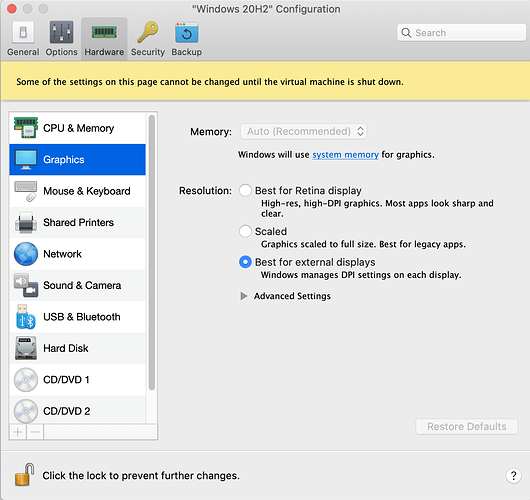
(1) 在 Parallels 中:配置…图形…分辨率。(如果机器正在运行,则选择 视图…Retina 分辨率)。这里有三个选项。在我的设置中,我看不出“缩放”、“Retina 显示器最佳”或“外部显示器最佳”之间有明显的区别,但在您的设置中可能会有所不同。您可能需要关闭 Windows 才能看到更改。
PastedGraphic-2.png1350×1272 191 KB
如果您对 Parallels 的设置不满意,尝试仅更改 Paratext 的缩放选项可能会成功:
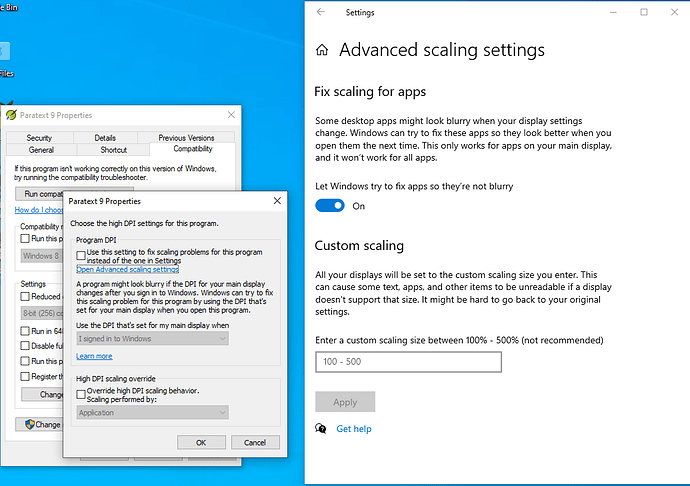
(2) 右键单击 Paratext 图标,点击 属性…兼容性…更改高 DPI 设置。我看到两个复选框,在我的电脑上它们都未选中。还要注意“打开高级缩放设置”的链接。我认为当您更改 (1) 中的设置时,Parallels 会自动调整这些“高级缩放设置”。
PastedGraphic-1.png1035×729 68.3 KB
希望您能找到解决方案。
This sounds like a problem with scaling. There are two different places you can change things:
(1) in Parallels: Configuration…Graphics…Resolution. (If the machine is running, then View…Retina Resolution). There are three options here. On my setup I can’t really see a difference between “Scaled”, “Best for Retina display” or “Best for external displays” but for your setup maybe it would make a difference. You will probably need to shutdown Windows to see the change.
PastedGraphic-2.png1350×1272 191 KB
If you don’t get satisfaction with the Parallels settings, you might have success with changing the scaling options for just Paratext:
(2) Right-click on the Paratext icon, click Properties…Compatibility…Change high DPI settings. I see two checkboxes and they’re both unchecked on my computer. Note also the link to “Open Advanced scaling settings.” I think these "Advanced scaling settings” get adjusted by Parallels automatically when you change the settings in (1)
PastedGraphic-1.png1035×729 68.3 KB
I hope you find the solution.
机器翻译自 English








