Cela ressemble à un problème de mise à l'échelle. Il y a deux endroits différents où vous pouvez effectuer des modifications :
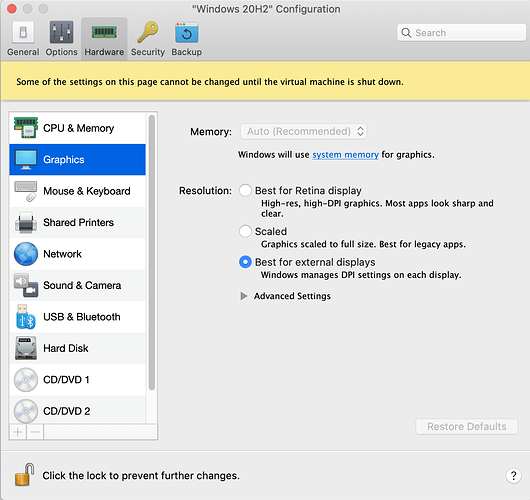
(1) dans Parallels : Configuration…Graphiques…Résolution. (Si la machine est en cours d'exécution, alors Affichage…Résolution Retina). Il y a trois options ici. Avec ma configuration, je ne vois pas vraiment de différence entre « Mise à l'échelle », « Meilleur pour l'affichage Retina » ou « Meilleur pour les affichages externes », mais pour votre configuration, cela pourrait faire une différence. Vous devrez probablement arrêter Windows pour voir le changement.
PastedGraphic-2.png1350×1272 191 KB
Si les paramètres de Parallels ne vous satisfont pas, vous pourriez avoir du succès en modifiant les options de mise à l'échelle uniquement pour Paratext :
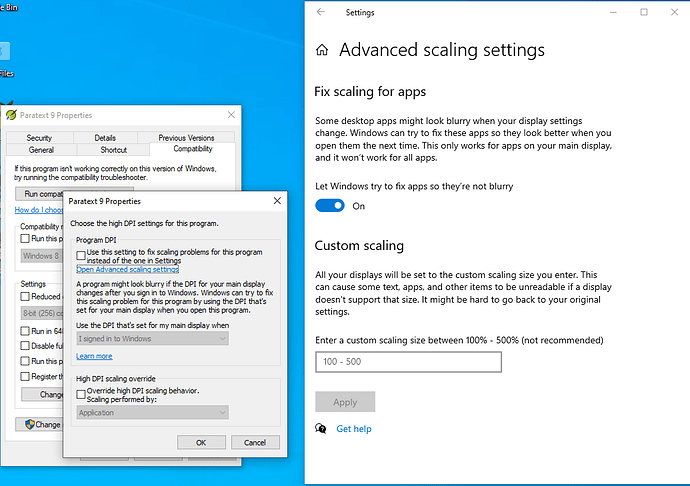
(2) Faites un clic droit sur l'icône de Paratext, cliquez sur Propriétés…Compatibilité…Modifier les paramètres de DPI élevés. Je vois deux cases à cocher et elles sont toutes les deux décochées sur mon ordinateur. Notez également le lien vers « Ouvrir les paramètres de mise à l'échelle avancés ». Je pense que ces « Paramètres de mise à l'échelle avancés » sont ajustés automatiquement par Parallels lorsque vous modifiez les paramètres dans (1)
PastedGraphic-1.png1035×729 68.3 KB
J'espère que vous trouverez la solution.
This sounds like a problem with scaling. There are two different places you can change things:
(1) in Parallels: Configuration…Graphics…Resolution. (If the machine is running, then View…Retina Resolution). There are three options here. On my setup I can’t really see a difference between “Scaled”, “Best for Retina display” or “Best for external displays” but for your setup maybe it would make a difference. You will probably need to shutdown Windows to see the change.
PastedGraphic-2.png1350×1272 191 KB
If you don’t get satisfaction with the Parallels settings, you might have success with changing the scaling options for just Paratext:
(2) Right-click on the Paratext icon, click Properties…Compatibility…Change high DPI settings. I see two checkboxes and they’re both unchecked on my computer. Note also the link to “Open Advanced scaling settings.” I think these "Advanced scaling settings” get adjusted by Parallels automatically when you change the settings in (1)
PastedGraphic-1.png1035×729 68.3 KB
I hope you find the solution.
Traduit automatiquement depuis English








