Ini terdengar seperti masalah dengan skala. Ada dua tempat berbeda di mana Anda dapat mengubah pengaturan:
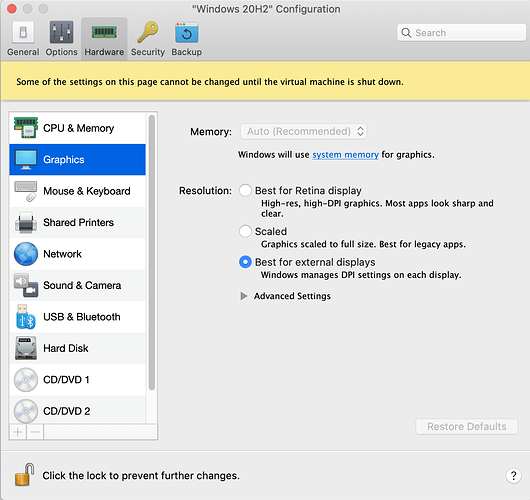
(1) di Parallels: Configuration…Graphics…Resolution. (Jika mesin sedang berjalan, maka View…Retina Resolution). Ada tiga opsi di sini. Pada pengaturan saya, saya tidak benar-benar melihat perbedaan antara “Scaled”, “Best for Retina display” atau “Best for external displays” tetapi untuk pengaturan Anda mungkin akan membuat perbedaan. Anda mungkin perlu mematikan Windows untuk melihat perubahan.
PastedGraphic-2.png1350×1272 191 KB
Jika Anda tidak puas dengan pengaturan Parallels, Anda mungkin berhasil dengan mengubah opsi skala hanya untuk Paratext:
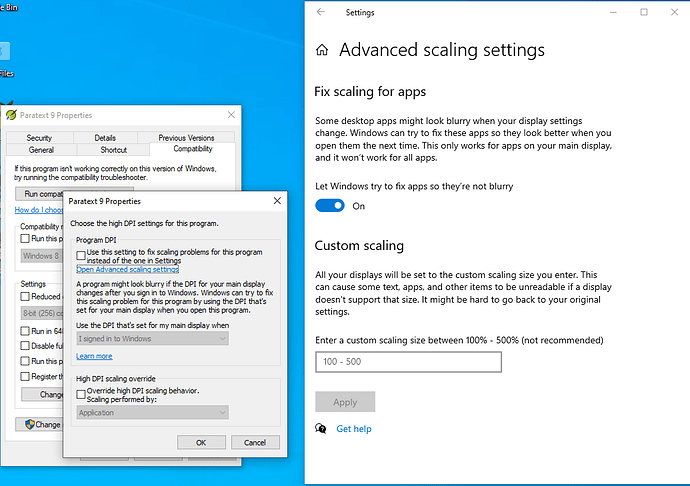
(2) Klik kanan pada ikon Paratext, klik Properties…Compatibility…Change high DPI settings. Saya melihat dua kotak centang dan keduanya tidak dicentang di komputer saya. Perhatikan juga tautan ke “Open Advanced scaling settings.” Saya pikir “Advanced scaling settings” ini disesuaikan secara otomatis oleh Parallels ketika Anda mengubah pengaturan di (1)
PastedGraphic-1.png1035×729 68.3 KB
Semoga Anda menemukan solusinya.
This sounds like a problem with scaling. There are two different places you can change things:
(1) in Parallels: Configuration…Graphics…Resolution. (If the machine is running, then View…Retina Resolution). There are three options here. On my setup I can’t really see a difference between “Scaled”, “Best for Retina display” or “Best for external displays” but for your setup maybe it would make a difference. You will probably need to shutdown Windows to see the change.
PastedGraphic-2.png1350×1272 191 KB
If you don’t get satisfaction with the Parallels settings, you might have success with changing the scaling options for just Paratext:
(2) Right-click on the Paratext icon, click Properties…Compatibility…Change high DPI settings. I see two checkboxes and they’re both unchecked on my computer. Note also the link to “Open Advanced scaling settings.” I think these "Advanced scaling settings” get adjusted by Parallels automatically when you change the settings in (1)
PastedGraphic-1.png1035×729 68.3 KB
I hope you find the solution.
Diterjemahkan secara otomatis dari English








