Похоже, это проблема с масштабированием. Есть два разных места, где можно внести изменения:
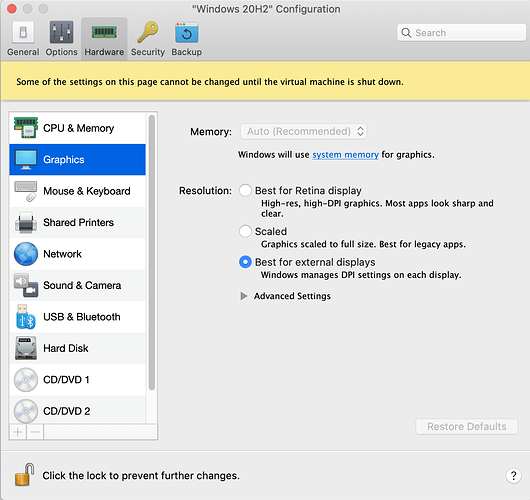
(1) в Parallels: Configuration…Graphics…Resolution. (Если машина запущена, то View…Retina Resolution). Здесь есть три варианта. В моей конфигурации я не могу реально увидеть разницу между «Scaled», «Best for Retina display» или «Best for external displays», но в вашей конфигурации это может иметь значение. Вероятно, вам потребуется выключить Windows, чтобы увидеть изменения.
PastedGraphic-2.png1350×1272 191 KB
Если настройки Parallels не приносят удовлетворения, вы можете добиться успеха, изменив параметры масштабирования только для Paratext:
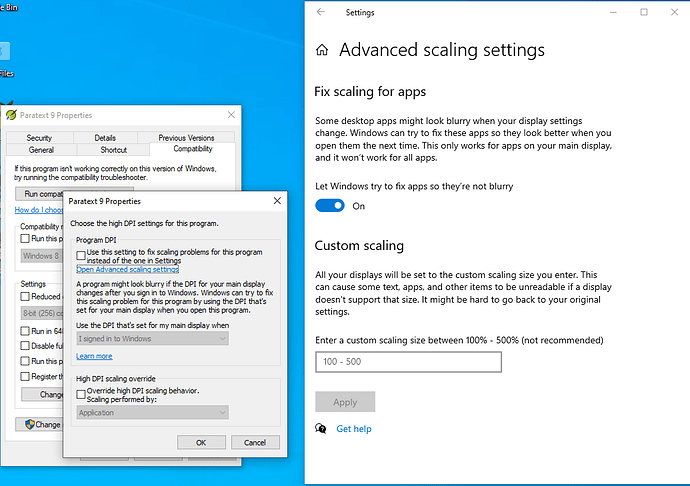
(2) Щелкните правой кнопкой мыши по иконке Paratext, нажмите Properties…Compatibility…Change high DPI settings. Я вижу два флажка, и на моем компьютере оба они сняты. Обратите также внимание на ссылку «Open Advanced scaling settings». Я думаю, что эти «Advanced scaling settings» автоматически настраиваются Parallels, когда вы изменяете настройки в (1)
PastedGraphic-1.png1035×729 68.3 KB
Надеюсь, вы найдете решение.
This sounds like a problem with scaling. There are two different places you can change things:
(1) in Parallels: Configuration…Graphics…Resolution. (If the machine is running, then View…Retina Resolution). There are three options here. On my setup I can’t really see a difference between “Scaled”, “Best for Retina display” or “Best for external displays” but for your setup maybe it would make a difference. You will probably need to shutdown Windows to see the change.
PastedGraphic-2.png1350×1272 191 KB
If you don’t get satisfaction with the Parallels settings, you might have success with changing the scaling options for just Paratext:
(2) Right-click on the Paratext icon, click Properties…Compatibility…Change high DPI settings. I see two checkboxes and they’re both unchecked on my computer. Note also the link to “Open Advanced scaling settings.” I think these "Advanced scaling settings” get adjusted by Parallels automatically when you change the settings in (1)
PastedGraphic-1.png1035×729 68.3 KB
I hope you find the solution.








