刚刚完成了一卷重要的新约书卷,我想写下一些关于我如何组织工作流的思考。我在主题中写了“最佳实践”,因为这是一个广为人知的短语,而且“相当不错但可能还有改进空间的做法”占用了太多空间。我希望随着时间的推移,其他人也能在这里分享类似的做法,这样我们可以从彼此那里获得提高效率的好主意。
这一切都发生在书籍大致排版完成之后,我剩下的唯一任务就是逐页检查,确保每行的结尾都在页面底部。这是一个耗时数小时但极其重复的步骤——非常适合进行流程优化!
- 我没有在 PTXprint 中打开 Changes.txt 文件——如果你同时在 PTXprint 和外部程序中打开它,每次更改后都需要刷新(Refresh)。但通过这种方式,我可以在外部编辑它而无需刷新。
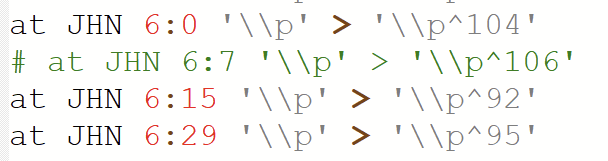
- 我在 Notepad++ 中打开了 Changes.txt。然后将“语言”更改为“Shell”。它(显然)实际上并不是一个 shell 文档,但它使用 # 注释字符,因此这种可视化的彩色标记非常有帮助。
- 为了在不关闭其他程序的情况下隔离我的工作环境,我将三个程序移动到了一个新的 Windows 桌面:Notepad++、PTXprint 和 Sumatra。
- 每次我想添加新的更改时——我 95% 的更改只是使用 p^95 系统来缩小和拉伸段落——我会在 Notepad++ 中按 Ctrl-d 添加一行(我也使用了很多其他快捷键,但我建议你在需要时在线查找它们。Ctrl-l(就像 llama 中的 l)删除一行,等等。)
- 我使用 Ctrl-方向键来按单词左右移动,而不是按单个字符移动。
- 我使用 Alt-Tab 在程序之间切换,并在 PTXprint 中使用 Ctrl-P 进行打印。我的目标是几乎从不触碰鼠标或触控板,我几乎总是能做到这一点。
- 我在 Sumatra 中使用“书籍视图”(Book View),这样我就可以像打开的书一样看到跨页。
- 我一次只处理一本书,这样我就不必等待整个新约编译完成,而且当我开始处理一本书时,我只打印前 5 章左右。如果在我到达范围末尾后需要更多,我会添加(例如“MAT 1-10”),如果某一章恰好从奇数页的顶部开始,我会让未来的运行从那里开始(例如,如果第 6 章从奇数页开始,那么我只打印“MAT 6-11”)。
- 如果必要,我会在书的末尾使用 Changes.txt 添加一个空白页,以便书的页数总是偶数。这意味着新书总是从奇数页的开头开始(你需要决定是否愿意有时出现空白页)。
- 我训练我的妻子也做其中很多工作,这为我节省了几小时

- 在我写这些内容时,我又想到了另一个主意!很可能下次我做这件事时,我会将 PTXprint 命令行调用添加到 Notepad++ 的宏系统中,这样我就可以从 Notepad++ 通过快捷键打印文件,而完全不需要打开 PTXprint。
Having just finished a major NT volume, I thought I’d write up some thoughts on how I organized workflow. I wrote “best practices” in the topic because that’s a well known phrase, and because “pretty good practices which could probably be improved upon” took too much space. I’m hoping over time that other people do similar things here, so that we can get good ideas for efficiency from each other.
This all takes place after the book was more or less laid out, and my one remaining task was to go through each page and make sure the lines ended at the bottom of the page. This is a step which takes many hours but is extremely repetitive–a great recipe for streamlining!
- I didn’t open the Changes.txt file within PTXprint–if you open it in PTXprint and also externally, you have to Refresh after each change. But by doing this I can edit it externally without needing to refresh.
- I opened Changes.txt in Notepad++. I then changed the “language” to “Shell”. It’s (obviously) not actually a shell document, but it uses # comment characters and so the visual, colorful markup is very helpful.
- In order to isolate my work environment without closing other programs, I moved three things to a new Windows desktop: Notepad++, PTXprint, and Sumatra.
- Each time I wanted to add a new change–95% of my changes were simply using the p^95 system to shrink and stretch paragraphs–I hit Ctrl-d in Notepad++ to add a line (I also used lots of other keycommands, but I’d recommend looking them up online as you need them. Ctrl-l (as in llama) deletes a line, etc.)
- I used Ctrl-arrow keys to move left and right full works instead of single characters.
- I used Alt-Tab to switch between programs, and Ctrl-P to print in PTXprint. My goal was to never touch the mouse or touchpad, and I could get by with that almost always.
- I used Book View in Sumatra so that I could see the spread as if the book were open.
- I worked on one book at a time, so I wouldn’t have to wait for the entire NT to compile, and when I started a book, I would only print the first 5 or so chapters. If needed after I got to the end of my range, I’d add (so “MAT 1-10”) and if a chapter ever happen to start at the top of an odd page, I would have future runs start from there (so, if ch.6 started an odd page, I would then only print “MAT 6-11”).
- If necessary at the end of books I’d use Changes.txt to add a blank page, so that books were always even numbers of pages long. This meant that new books always start at the beginning of an odd page (you’ll have to decide if you’re willing to have blank pages sometimes).
- I trained my wife to do much of this also, which saved me hours
- As I’ve been writing this up, another idea has come to me! Likely next time I do this I’ll add PTXprint command line call to Notepad++'s macro system, so that I can print the file with a key command from Notepad++ and won’t need to have PTXprint open at all.
机器翻译自 English








