有几种方法可以实现您想要的效果。
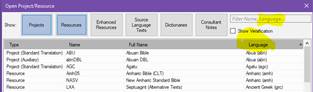
首先,在“打开项目/资源”(Open Project/Resource)菜单中,您可以按语言排序。那里既有语言列,也有语言过滤器。但是,除非您的团队正确选择了他们的语言,否则这不会非常有效。如果这是一个问题,我强烈建议立即修复它。此外,由于回译(back translations)通常使用主要语言,因此这也不会包含语言项目的回译。所以还有两种非常有帮助的方法……
其次,在同一个菜单中,您可以选择一组项目并保存该选择。按住 ctrl 键同时选择多个您想要作为一组打开的项目。然后在“已保存的选择”(saved selections)窗口中为它们命名,并点击保存图标。这样,当您选择该选项时,这组项目将一起打开。如果您查找它,该选择将在任何您可以选择文本的地方可用。在同一个窗口中,您可以选择将它们全部作为文本集合(Text collection)打开,例如。在下面的示例中,我正在将五个 MLT 语言项目作为文本集合打开。

第三,您可以保存布局。打开您想要一起处理的项目,按照您想要的方式设置它们,然后转到 Paratext 主菜单,在“布局”(Layout)列下选择“保存当前布局”(Save Current Layout)。将来无论何时选择它,所有窗口都将按照您现在保存的方式打开。
祝福,
There are a number of ways to get what you want.
Firstly, in the Open Project/Resource menu, you can sort by language. There is both a column and a filter for language. This won’t work very well, however, unless your teams have properly chosen their language. I highly recommend getting that fixed right away if it is a problem. Also, it would not include back translations for a language project since those would be in a major language presumably. So there are two other ways which are very helpful…
Secondly, in the very same menu you can choose a set of projects and save the selection. Choose multiple projects that you want to open as a set by holding down the ctrl key while selecting. Then name them in the “saved selections” window and click the save icon. This set of projects will then open all together whenever you choose that selection. If you look for it, this selection will then be available wherever you are able to select texts. In this same window, you can choose to open them all as a Text collection, for example. In the example below, I am opening the five MLT language projects as a Text Collection.
Thirdly, you can save layouts. Open the projects that you want to work on together, set them up just the way you want them, and then go to the Main Paratext menu and choose Save Current Layout under the Layout column. Whenever you choose it in the future, all the windows will open exactly the way you have saved it now.
Blessings,
机器翻译自 English








