Ada beberapa cara untuk mendapatkan apa yang Anda inginkan.
Pertama, di menu Open Project/Resource, Anda dapat mengurutkan berdasarkan bahasa. Ada kolom dan filter untuk bahasa. Namun, ini tidak akan berfungsi dengan baik kecuali tim Anda telah memilih bahasa mereka dengan benar. Saya sangat merekomendasikan untuk memperbaikinya segera jika itu menjadi masalah. Selain itu, ini tidak akan mencakup terjemahan balik (back translation) untuk proyek bahasa karena terjemahan balik tersebut kemungkinan besar akan berada dalam bahasa utama. Jadi ada dua cara lain yang sangat membantu…
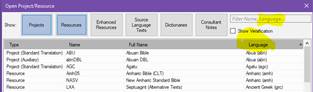
Kedua, di menu yang sama persis, Anda dapat memilih seperangkat proyek dan menyimpan pilihan tersebut. Pilih beberapa proyek yang ingin Anda buka sebagai satu set dengan menahan tombol ctrl sambil memilih. Kemudian beri nama mereka di jendela “saved selections” dan klik ikon simpan. Perangkat proyek ini kemudian akan terbuka bersama setiap kali Anda memilih pilihan tersebut. Jika Anda mencarinya, pilihan ini kemudian akan tersedia di mana pun Anda dapat memilih teks. Di jendela yang sama ini, Anda dapat memilih untuk membukanya semua sebagai kumpulan Teks (Text collection), misalnya. Pada contoh di bawah, saya membuka lima proyek bahasa MLT sebagai Kumpulan Teks (Text Collection).

Ketiga, Anda dapat menyimpan tata letak (layouts). Buka proyek yang ingin Anda kerjakan bersama, atur sesuai keinginan Anda, lalu pergi ke menu utama Paratext dan pilih Save Current Layout di bawah kolom Layout. Kapan pun Anda memilihnya di masa depan, semua jendela akan terbuka persis seperti yang telah Anda simpan sekarang.
Doa berkat,
There are a number of ways to get what you want.
Firstly, in the Open Project/Resource menu, you can sort by language. There is both a column and a filter for language. This won’t work very well, however, unless your teams have properly chosen their language. I highly recommend getting that fixed right away if it is a problem. Also, it would not include back translations for a language project since those would be in a major language presumably. So there are two other ways which are very helpful…
Secondly, in the very same menu you can choose a set of projects and save the selection. Choose multiple projects that you want to open as a set by holding down the ctrl key while selecting. Then name them in the “saved selections” window and click the save icon. This set of projects will then open all together whenever you choose that selection. If you look for it, this selection will then be available wherever you are able to select texts. In this same window, you can choose to open them all as a Text collection, for example. In the example below, I am opening the five MLT language projects as a Text Collection.
Thirdly, you can save layouts. Open the projects that you want to work on together, set them up just the way you want them, and then go to the Main Paratext menu and choose Save Current Layout under the Layout column. Whenever you choose it in the future, all the windows will open exactly the way you have saved it now.
Blessings,
Diterjemahkan secara otomatis dari English








