Há várias maneiras de obter o que você deseja.
Primeiro, no menu Abrir Projeto/Recurso, você pode ordenar por idioma. Há uma coluna e um filtro para idioma. No entanto, isso não funcionará muito bem, a menos que suas equipes tenham escolhido corretamente seu idioma. Recomendo fortemente corrigir isso imediatamente, se for um problema. Além disso, isso não incluiria traduções reversas para um projeto de idioma, pois essas estariam presumivelmente em um idioma principal. Portanto, há outras duas maneiras que são muito úteis…
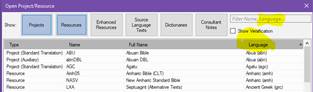
Segundo, no mesmo menu, você pode escolher um conjunto de projetos e salvar a seleção. Selecione vários projetos que deseja abrir como um conjunto segurando a tecla ctrl enquanto seleciona. Em seguida, dê-lhes um nome na janela “seleções salvas” e clique no ícone de salvar. Esse conjunto de projetos será aberto todos juntos sempre que você escolher essa seleção. Se você procurar, essa seleção estará disponível em qualquer lugar onde você possa selecionar textos. Nesta mesma janela, você pode escolher abri-los todos como uma coleção de textos, por exemplo. No exemplo abaixo, estou abrindo os cinco projetos de idioma MLT como uma Coleção de Textos.

Terceiro, você pode salvar layouts. Abra os projetos com os quais deseja trabalhar juntos, configure-os exatamente como deseja e, em seguida, vá para o menu principal do Paratext e escolha Salvar Layout Atual (Save Current Layout) na coluna Layout. Sempre que você escolher isso no futuro, todas as janelas serão abertas exatamente da maneira como você salvou agora.
Abençoados,
There are a number of ways to get what you want.
Firstly, in the Open Project/Resource menu, you can sort by language. There is both a column and a filter for language. This won’t work very well, however, unless your teams have properly chosen their language. I highly recommend getting that fixed right away if it is a problem. Also, it would not include back translations for a language project since those would be in a major language presumably. So there are two other ways which are very helpful…
Secondly, in the very same menu you can choose a set of projects and save the selection. Choose multiple projects that you want to open as a set by holding down the ctrl key while selecting. Then name them in the “saved selections” window and click the save icon. This set of projects will then open all together whenever you choose that selection. If you look for it, this selection will then be available wherever you are able to select texts. In this same window, you can choose to open them all as a Text collection, for example. In the example below, I am opening the five MLT language projects as a Text Collection.
Thirdly, you can save layouts. Open the projects that you want to work on together, set them up just the way you want them, and then go to the Main Paratext menu and choose Save Current Layout under the Layout column. Whenever you choose it in the future, all the windows will open exactly the way you have saved it now.
Blessings,








