你好,我遇到了同樣的問題,以下是 Doug Higby 在十二月回覆的內容,幫助我解決了問題:
您的對照譯文數據儲存在資料庫中,並標記了註釋(glosses)的語言。您可以查看 Paratext 專案目錄,看看您現有的對照譯文是用什麼語言代碼標記註釋的。
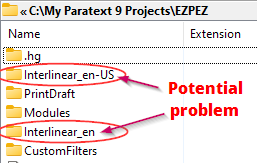
假設在升級到 9.2 並重新開啟對照譯文後,您所有的註釋都消失了。如果您尚未在新的空白對照譯文中進行任何工作,這裡只會顯示一個目錄,即 en-US。也就是您一直使用的語言標籤。要再次看到您的註釋,您需要以兩種方式之一建立新的對照譯文:
- 建立一個沒有模型文本的對照譯文,並選擇 en-US 作為語言。
或者
- 建立一個模型文本為 en-US 的對照譯文。您可以在「開啟資源」(Open Resource)對話方塊中看到模型文本的語言:

如果您有兩個 interlinear_XYZ 目錄,且不知道哪一個是您一直使用的語言代碼,只需開啟每個目錄,看看哪一個有更多檔案,且日期較早。在頂部的截圖中,Interlinear_en 資料夾中只有一個檔案,大小僅為 500 位元組。另一個資料夾有多卷書,檔案大小較大。顯然,如果我想要看到我的註釋回來,在設定對照譯文時需要選擇 en-US 作為語言。
Hello, I had the same problem and this was what Doug Higby sent back in December which helped me fix the problem:
Your interlinear data is stored in the database and tagged with the language of the glosses. You can look in your Paratext project directory to see what language code(s) your existing interlinear has been tagging the glosses with.
Let’s say that all your glosses went missing after upgrading to 9.2 and reopening the interlinear. If you haven’t worked yet in the new blank interlinear, you will only have one directory showing here, en-US. The one with the language tag you have been using. To see your glosses again, you will need to create a new interlinear in one of two ways:
- Create an interlinear with no model text, and select en-US as the language.
OR
- Create an interlinear with a model text that is en-US. You can see the language of the model text in the Open Resource dialog:
If you have two interlinear_XYZ directories and don’t know which is the language code you have been using, just open each directory and see which one has more files, and with past dates. In the screenshot at top, the Interlinear_en folder had only one file in it that was only 500bytes in size. The other one had multiple books with larger file sizes. Clearly, en-US is the language I need to select when setting up the interlinear if I want to see my glosses back.
機器翻譯自 English








