Hola, tuve el mismo problema y esto es lo que Doug Higby envió en diciembre, lo cual me ayudó a corregir el problema:
Sus datos interlineales se almacenan en la base de datos y están etiquetados con el idioma de las glosas. Puede buscar en el directorio de su proyecto de Paratext para ver con qué código(s) de idioma su interlinear existente ha estado etiquetando las glosas.
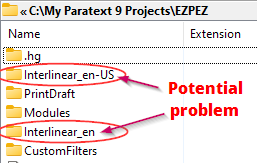
Digamos que todas sus glosas desaparecieron después de actualizar a 9.2 y reabrir el interlinear. Si aún no ha trabajado en el nuevo interlinear en blanco, solo tendrá un directorio que se muestra aquí, en-US. El que tiene la etiqueta de idioma que ha estado usando. Para ver sus glosas de nuevo, necesitará crear un nuevo interlinear de una de dos maneras:
- Crear un interlinear sin texto modelo y seleccionar en-US como el idioma.
O
- Crear un interlinear con un texto modelo que sea en-US. Puede ver el idioma del texto modelo en el cuadro de diálogo Abrir recurso:

Si tiene dos directorios interlinear_XYZ y no sabe cuál es el código de idioma que ha estado usando, simplemente abra cada directorio y vea cuál tiene más archivos y con fechas anteriores. En la captura de pantalla de arriba, la carpeta Interlinear_en solo tenía un archivo de 500 bytes de tamaño. El otro tenía varios libros con tamaños de archivo más grandes. Claramente, en-US es el idioma que necesito seleccionar al configurar el interlinear si quiero ver mis glosas de nuevo.
Hello, I had the same problem and this was what Doug Higby sent back in December which helped me fix the problem:
Your interlinear data is stored in the database and tagged with the language of the glosses. You can look in your Paratext project directory to see what language code(s) your existing interlinear has been tagging the glosses with.
Let’s say that all your glosses went missing after upgrading to 9.2 and reopening the interlinear. If you haven’t worked yet in the new blank interlinear, you will only have one directory showing here, en-US. The one with the language tag you have been using. To see your glosses again, you will need to create a new interlinear in one of two ways:
- Create an interlinear with no model text, and select en-US as the language.
OR
- Create an interlinear with a model text that is en-US. You can see the language of the model text in the Open Resource dialog:
If you have two interlinear_XYZ directories and don’t know which is the language code you have been using, just open each directory and see which one has more files, and with past dates. In the screenshot at top, the Interlinear_en folder had only one file in it that was only 500bytes in size. The other one had multiple books with larger file sizes. Clearly, en-US is the language I need to select when setting up the interlinear if I want to see my glosses back.
Traducción automática desde English








