Paratext 只能自動排序在「聖經術語」(Biblical Terms)工具中正確連結的詞彙表條目。在詞彙表中更改引文形式的拼寫會導致「聖經術語」工具中的連結中斷。您必須開啟「聖經術語」工具,並重新將該引文形式連結到對應的聖經術語。您可以透過查看「聖經術語」工具中詞彙表標籤頁上的星號(asterisk)來驗證詞彙表中的引文形式是否已連結到聖經術語。
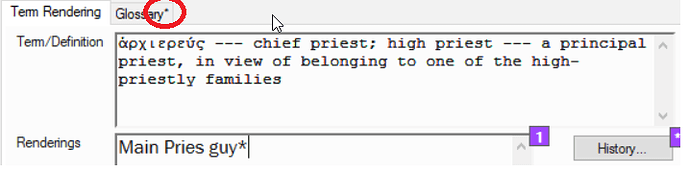
image718×181 30.3 KB
如果沒有星號,請按照以下步驟連結該術語:
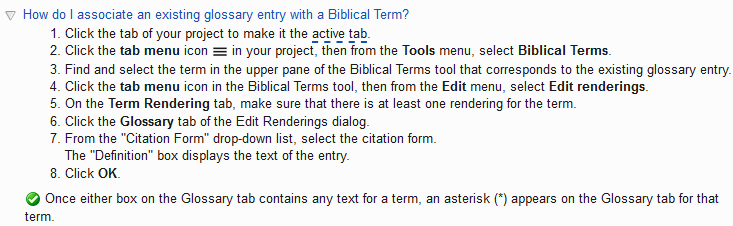
image733×226 9.77 KB
Paratext 現在將根據您專案語言設定中的排序順序,正確排序該詞彙表條目。請對所有已變更且未正確排序的條目重複此過程。
Paratext can only automatically sort glossary entries that are properly linked in the Biblical terms tool. Changing the spelling of a citation form in the glossary breaks the link in the Biblical terms tool. You will have to open the Biblical terms tool and re-link the citation form to the Biblical term. You can verify that glossary citation form is linked to the Biblical term by looking for an asterisks on the glossary tab in the Biblical terms tool.
image718×181 30.3 KB
If there is no asterisks, then link the term by doing the following steps:
image733×226 9.77 KB
Paratext will now correctly sort that glossary entry using the sort order in your projects language settings. Repeat this process for all entries that have changed and are no longer being sorted correctly.
機器翻譯自 English








