Paratext hanya dapat mengurutkan entri glosarium secara otomatis jika entri tersebut terhubung dengan benar di alat Istilah Alkitab (Biblical Terms). Mengubah ejaan bentuk kutipan di glosarium akan memutus tautan di alat Istilah Alkitab (Biblical Terms). Anda harus membuka alat Istilah Alkitab (Biblical Terms) dan menautkan kembali bentuk kutipan tersebut ke istilah Alkitab. Anda dapat memverifikasi apakah bentuk kutipan glosarium terhubung ke istilah Alkitab dengan mencari tanda bintang di tab glosarium di alat Istilah Alkitab (Biblical Terms).
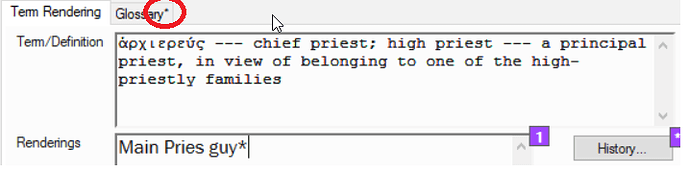
image718×181 30.3 KB
Jika tidak ada tanda bintang, tautkan istilahnya dengan melakukan langkah-langkah berikut:
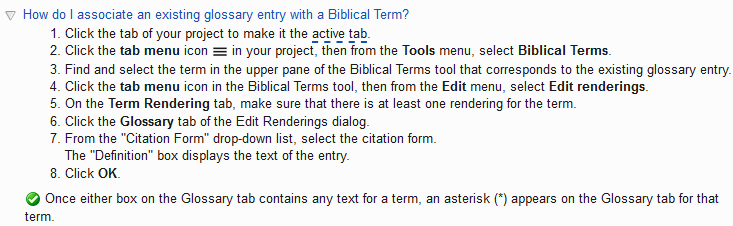
image733×226 9.77 KB
Paratext sekarang akan mengurutkan entri glosarium tersebut dengan benar menggunakan urutan pengurutan dalam pengaturan bahasa proyek Anda. Ulangi proses ini untuk semua entri yang telah berubah dan tidak lagi diurutkan dengan benar.
Paratext can only automatically sort glossary entries that are properly linked in the Biblical terms tool. Changing the spelling of a citation form in the glossary breaks the link in the Biblical terms tool. You will have to open the Biblical terms tool and re-link the citation form to the Biblical term. You can verify that glossary citation form is linked to the Biblical term by looking for an asterisks on the glossary tab in the Biblical terms tool.
image718×181 30.3 KB
If there is no asterisks, then link the term by doing the following steps:
image733×226 9.77 KB
Paratext will now correctly sort that glossary entry using the sort order in your projects language settings. Repeat this process for all entries that have changed and are no longer being sorted correctly.
Diterjemahkan secara otomatis dari English








