Paratext 只能自动排序在“圣经术语”(Biblical terms)工具中正确链接的词汇表条目。在词汇表中更改引文形式的拼写会破坏“圣经术语”工具中的链接。您需要打开“圣经术语”工具,并将引文形式重新链接到相应的圣经术语。您可以通过查看“圣经术语”工具中词汇表选项卡上的星号来验证词汇表引文形式是否已链接到圣经术语。
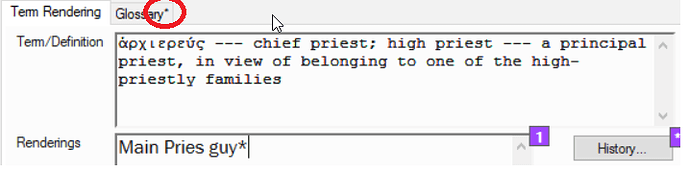
image718×181 30.3 KB
如果没有星号,请按照以下步骤链接该术语:
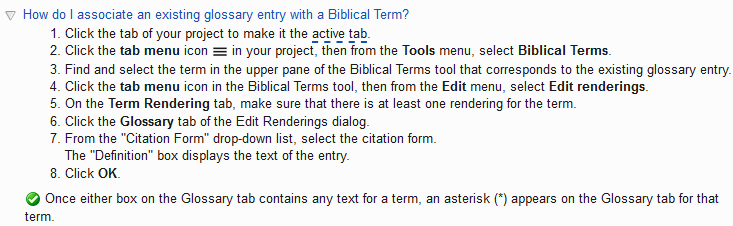
image733×226 9.77 KB
现在,Paratext 将根据您项目语言设置中的排序顺序正确排序该词汇表条目。对所有已更改且不再正确排序的条目重复此过程。
Paratext can only automatically sort glossary entries that are properly linked in the Biblical terms tool. Changing the spelling of a citation form in the glossary breaks the link in the Biblical terms tool. You will have to open the Biblical terms tool and re-link the citation form to the Biblical term. You can verify that glossary citation form is linked to the Biblical term by looking for an asterisks on the glossary tab in the Biblical terms tool.
image718×181 30.3 KB
If there is no asterisks, then link the term by doing the following steps:
image733×226 9.77 KB
Paratext will now correctly sort that glossary entry using the sort order in your projects language settings. Repeat this process for all entries that have changed and are no longer being sorted correctly.
机器翻译自 English








