Paratext может автоматически сортировать только те записи глоссария, которые правильно связаны в инструменте Biblical terms (Библийские термины). Изменение написания цитируемой формы в глоссарии нарушает связь в инструменте Biblical terms. Вам необходимо открыть инструмент Biblical terms и заново связать цитируемую форму с библейским термином. Вы можете убедиться, что цитируемая форма глоссария связана с библейским термином, посмотрев на наличие звездочки на вкладке глоссария в инструменте Biblical terms.
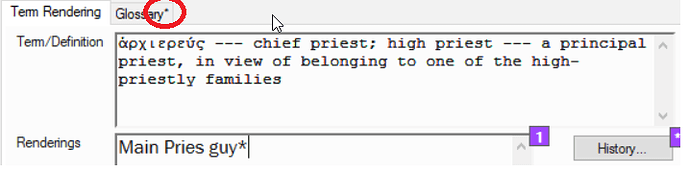
image718×181 30.3 KB
Если звездочки нет, свяжите термин, выполнив следующие шаги:
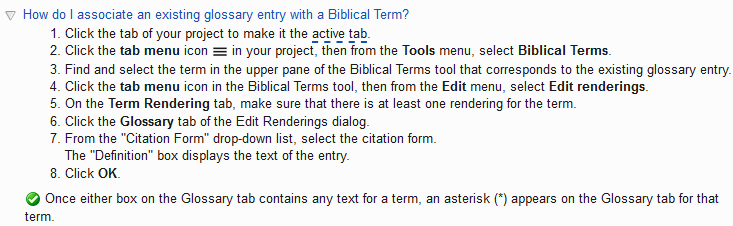
image733×226 9.77 KB
Теперь Paratext будет корректно сортировать эту запись глоссария, используя порядок сортировки в настройках языка вашего проекта. Повторите этот процесс для всех измененных записей, которые больше не сортируются правильно.
Paratext can only automatically sort glossary entries that are properly linked in the Biblical terms tool. Changing the spelling of a citation form in the glossary breaks the link in the Biblical terms tool. You will have to open the Biblical terms tool and re-link the citation form to the Biblical term. You can verify that glossary citation form is linked to the Biblical term by looking for an asterisks on the glossary tab in the Biblical terms tool.
image718×181 30.3 KB
If there is no asterisks, then link the term by doing the following steps:
image733×226 9.77 KB
Paratext will now correctly sort that glossary entry using the sort order in your projects language settings. Repeat this process for all entries that have changed and are no longer being sorted correctly.








