搜尋結果可能不同的原因:
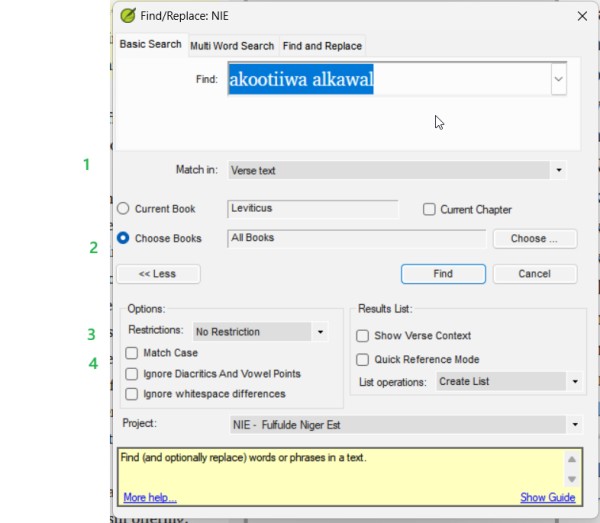
1) 匹配「節文本」(verse text)或「所有文本」(all text)
2) 書卷選擇是否相同?
3) 限制條件是否相同?
4) 區分大小寫開或關、忽略變音符號或元音點開或關、忽略空白差異開或關?
如果這些都匹配,不同電腦上的專案版本是否有差異?那台「異常」的電腦是否像其他電腦一樣最近執行過 Send/Receive?
另一個想法,也許那位「異常」的使用者應該重設他們的 Paratext,方法是在啟動時按住 Shift 鍵。當 Paratext 中的某些功能似乎運作不正常時,這可能會有幫助。
https://paratext.org/ufaqs/how-do-i-reset-paratext/
How searches can be different:
1) Match in "verse text" or "all text"
2) book selection the same?
3) restrictions the same?
4) Match case on or off, ignore diacritics or vowel points on or off, ignore whitespace differences on or off?
If those do all match, is there a difference in the project version on the different computers, has the one "odd" computer done a send/receive as recently as the others?
Another thought, maybe the "odd" user should reset their Paratext, by holding Shift when they start it. This can be helpful when something in Paratext does not seem to work right.
https://paratext.org/ufaqs/how-do-i-reset-paratext/
機器翻譯自 English








