Halo.
Mungkin, Anda salah memahami makna tanda elipsis? Tanda ini akan muncul ketika Anda membuat buku masa lalu di proyek atau sumber lain dan hanya muncul setelah paragraf yang berisi teks dari ayat sebelumnya.
Sebagai contoh, pada gambar berikut perhatikan bahwa ayat 6 berlanjut di paragraf berikutnya, hanya dalam kasus-kasus seperti itu, agar penerjemah menyadari bahwa di proyek asli ayat tersebut masih berlanjut, Paratext akan menyertakan tanda elipsis (...) antara penanda “p” dan “v 7”.
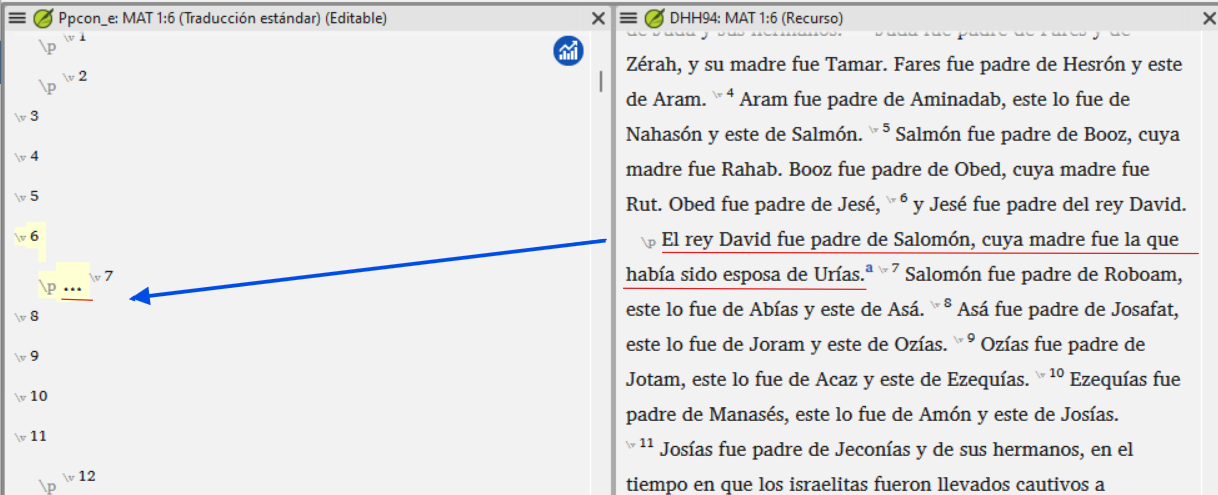
Dengan kata lain, paragraf tidak dimulai langsung dengan ayat 7 tetapi melanjutkan teks ayat 6.
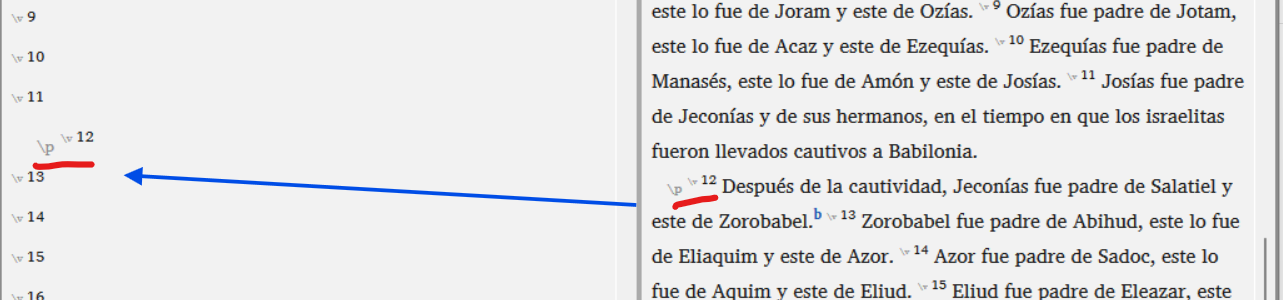
Sebaliknya, pada gambar berikut tidak ada tanda elipsis antara penanda “p” dan “v 12” karena tidak ada teks yang diharapkan di sana, tetapi ayat 12 dimulai segera di paragraf baru tersebut:
Pada akhirnya, penerjemah harus menghapus tanda elipsis untuk menempatkan teks.
Salam,
Pepe.
Hola.
Maybe, are you confusing the meaning of the ellipses? They will appear when you create a past book in another project or resource and appear only after a paragraph containing text from the previous verse.
For example in the following image notice that verse 6 continues in the next paragraph, only in those cases, so that the translator notices that in the original project the verse still continued, Paratext will include the ellipses (...) between the markers “p” and “v 7”.
In other words, the paragraph does not start directly with verse 7 but continues the text of verse 6.
In contrast, in the following image there are no ellipses between the marker “p” and “v 12” because no text is expected there, but verse 12 starts immediately in that new paragraph:
Eventually, the translator will have to remove the ellipses to place text.
Saludos,
Pepe.
Diterjemahkan secara otomatis dari Español








