您好。
正如其他相關回答所述,語言代碼必須完全相同。不僅是開頭的三個字母,而是後續的任何字符都必須一致。
在關於 ZTO 專案的截圖中,Paratext 中的代碼是 "npi",但在 FLEx 中是 "ne"。
請注意,FLEx 中必須匹配的欄位不是「縮寫 (Abreviation)」欄位,而是「代碼 (Code)」之後的內容。
對於 LZZ 專案,看起來 Paratext 和 FLEx 確實擁有相同的代碼 "lzz-TR"。您是否已關閉 Paratext 並重新開啟以進行關聯?我曾遇到過這種情況:如果在 FLEx 中更改了原文語言設定,必須關閉並重新開啟 Paratext,它才會實際讀取到該變更。
若要再次檢查,您可以定義將保留哪個語言代碼。如果將保留 Paratext 中的代碼,那麼對於 FLEx 中的變更,您可以 1) 尋找完全匹配的語言代碼(包括連字符和額外字母):
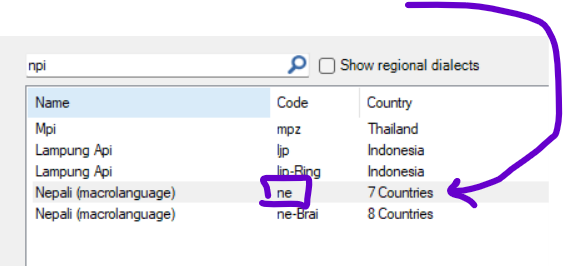
或 2) 使用「進階 (Advanced)」選項來添加額外設定。
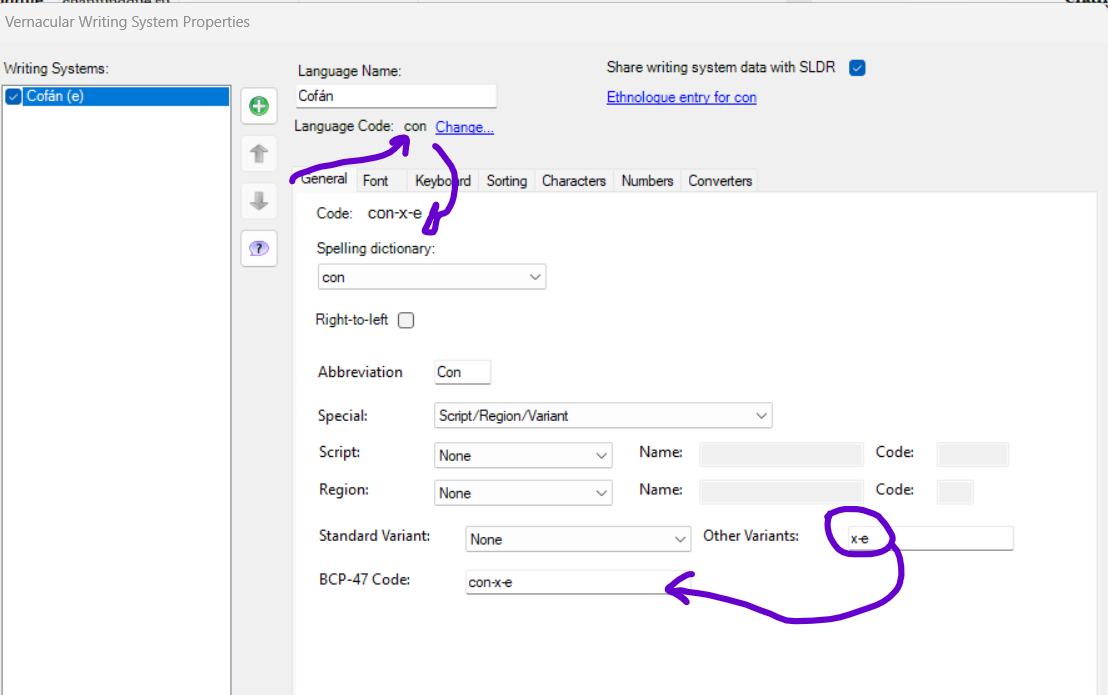
舉例來說,我們曾遇到一個案例,由於與 Windows 衝突,無法使用 "con" 語言代碼。為解決此問題,我們使用了進階選項,並在「其他變體 (Other Variants)」中為該語言添加了變體。
您的第二個專案可能屬於這種情況:
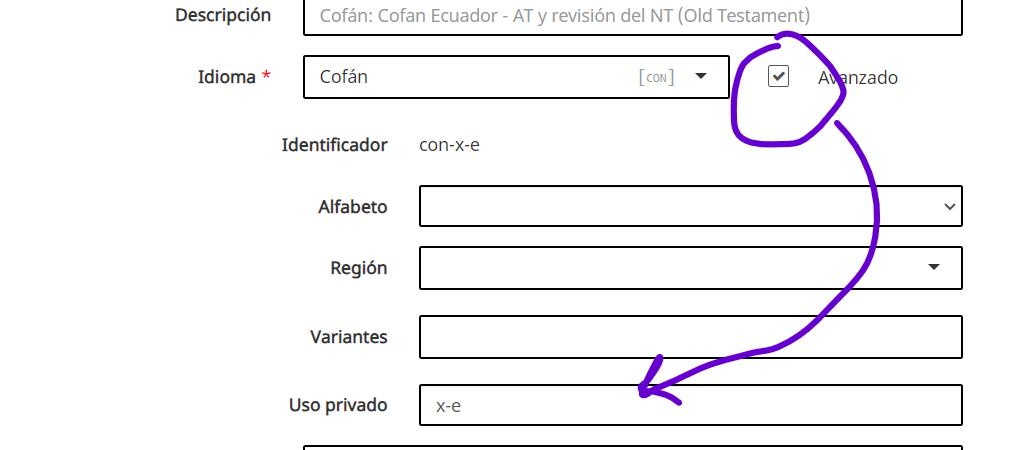
如果您需要在 Paratext 中更改語言,這可以由管理員從網頁端執行:
希望這對您有所幫助。
問候,
Pepe。
Hola.
As ne the other related answer, the language codes must be exactly the same. Not only in the initial 3 letters, but in any character that follows.
In your image about the ZTO project, in Paratext the code is "npi", but in Flex it is "ne".
Note that the field that must match in Flex is not the "Abreviation" field but what follows after "Code".
For the LZZ project, it looks like you do have the same code "lzz-TR", for Paratext and Flex. Did you close Paratext and reopen it to make the association? It has happened to me that if I change something in the vernacular language setting in Flex, I have to close and reopen Paratext so that it actually reads the change.
To check again, you can define which language code they will keep. If it will be the one in Paratext, then for the change in Flex you can 1) look for the exact matching language code (with dashes and extra letters):
or 2) use the "Advanced" option to add extra settings.
As an example, we had a case where we could not use the "con" language code because of conflicts with Windows. To solve this we used the advanced options and added variations to the language in "Other Variants".
This could be the case for your second project:
If you need to change the language in Paratext, this can be done by an Administrator from the Web:
I hope it will be useful.
Saludos,
Pepe.
機器翻譯自 Español








