Olá.
Como na outra resposta relacionada, os códigos de idioma devem ser exatamente os mesmos. Não apenas nas três primeiras letras, mas em qualquer caractere que venha depois.
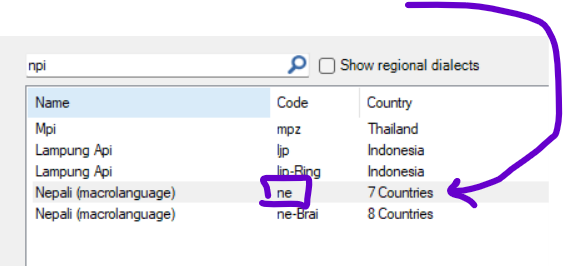
Na sua imagem sobre o projeto ZTO, no Paratext o código é "npi", mas no Flex é "ne".
Observe que o campo que deve corresponder no Flex não é o campo "Abreviation", mas sim o que vem depois de "Code".
Para o projeto LZZ, parece que você tem o mesmo código "lzz-TR" para o Paratext e o Flex. Você fechou o Paratext e o reabriu para fazer a associação? Já me aconteceu que, se eu altero algo na configuração do idioma vernáculo no Flex, preciso fechar e reabrir o Paratext para que ele realmente leia a alteração.
Para verificar novamente, você pode definir qual código de idioma eles manterão. Se for o do Paratext, então, para a alteração no Flex, você pode 1) procurar pelo código de idioma correspondente exato (com hífens e letras extras):
ou 2) usar a opção "Advanced" para adicionar configurações extras.
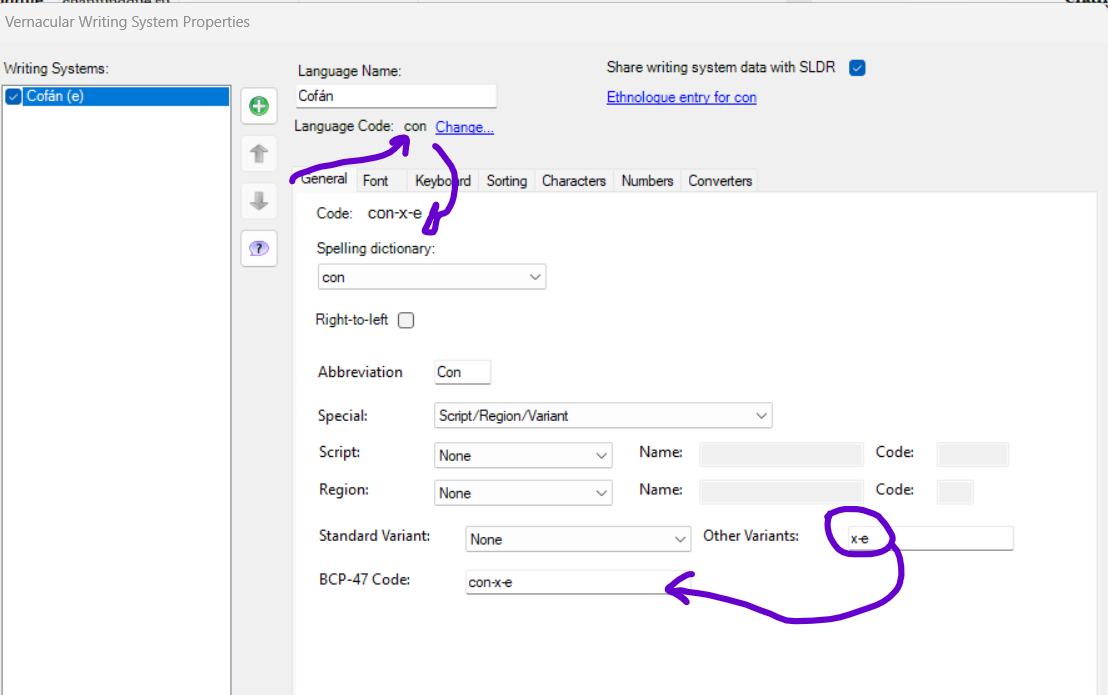
Como exemplo, tivemos um caso em que não podíamos usar o código de idioma "con" devido a conflitos com o Windows. Para resolver isso, usamos as opções avançadas e adicionamos variações ao idioma em "Other Variants".
Isso pode ser o caso do seu segundo projeto:
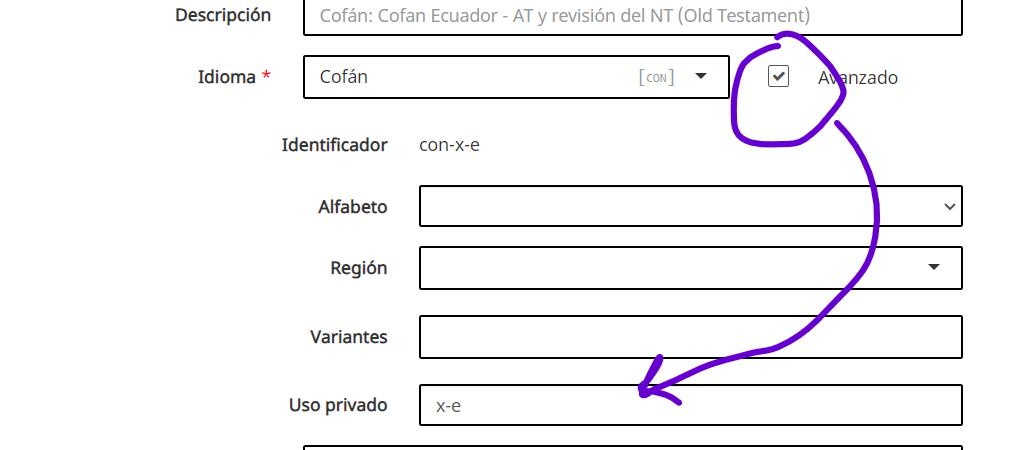
Se você precisar alterar o idioma no Paratext, isso pode ser feito por um Administrador pela Web:
Espero que seja útil.
Abraços,
Pepe.
Hola.
As ne the other related answer, the language codes must be exactly the same. Not only in the initial 3 letters, but in any character that follows.
In your image about the ZTO project, in Paratext the code is "npi", but in Flex it is "ne".
Note that the field that must match in Flex is not the "Abreviation" field but what follows after "Code".
For the LZZ project, it looks like you do have the same code "lzz-TR", for Paratext and Flex. Did you close Paratext and reopen it to make the association? It has happened to me that if I change something in the vernacular language setting in Flex, I have to close and reopen Paratext so that it actually reads the change.
To check again, you can define which language code they will keep. If it will be the one in Paratext, then for the change in Flex you can 1) look for the exact matching language code (with dashes and extra letters):
or 2) use the "Advanced" option to add extra settings.
As an example, we had a case where we could not use the "con" language code because of conflicts with Windows. To solve this we used the advanced options and added variations to the language in "Other Variants".
This could be the case for your second project:
If you need to change the language in Paratext, this can be done by an Administrator from the Web:
I hope it will be useful.
Saludos,
Pepe.
Tradução automática de Español








