在 RTL 文档中,我无法在表格单元格开头输入数字,除非添加不需要的标记和空格,或者出现检查错误。这些错误似乎在使用任何类型的数字紧跟表格单元格标记时都会发生。我想知道:这是一个 bug、一个功能,还是我操作有误?
情况 1 如果数字直接跟在单元格标记后面,表格单元格将完全不显示:
\tr \tc1 123 \tc2 456
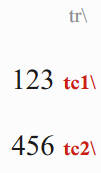
情况 2 如果添加从左到右的字符,表格单元格会正确显示,但会引发 Number Settings 错误:
\tr \tc1 [LTR]123 \tc2 [LTR]456
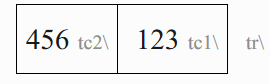
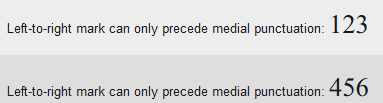
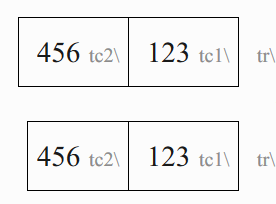
情况 3 如果添加从左到右的字符和空格,表格单元格会正确显示且不会引发错误,但这会在单元格中添加额外的空格。参见:
\tr \tc1 [LTR] 123 \tc2 [LTR] 456

\tr \tc1 [LTR]123 \tc2 [LTR]456
I am not able to put numbers as the first characters in a table cell in a RTL document without adding unwanted markers and spaces, or getting checking errors. These errors seem to occur using any type of digit following a table cell marker. I want to know: Is this a bug, a feature, or am I doing something wrong?
Case 1 A table cell does not display at all if numbers directly follow the cell marker:
\tr \tc1 123 \tc2 456
Case 2 The table cell displays correctly if a left-to-right character is added, however a Number Settings error is raised:
\tr \tc1 [LTR]123 \tc2 [LTR]456
Case 3 The table cell displays correctly and no error is raised if a left-to-right character and space is added, however this adds extra space to the cell. C.f.:
\tr \tc1 [LTR] 123 \tc2 [LTR] 456

\tr \tc1 [LTR]123 \tc2 [LTR]456
机器翻译自 English








