मैं RTL दस्तावेज़ में तालिका सेल में संख्याओं को प्रारंभिक अक्षरों के रूप में डालने में असमर्थ हूँ, जब तक कि मैं अवांछित मार्कर और स्थान (spaces) न जोड़ दूँ, या जाँच त्रुटियाँ (checking errors) न प्राप्त कर लूँ। ये त्रुटियाँ तालिका सेल मार्कर के बाद किसी भी प्रकार की अंक (digit) का उपयोग करने पर प्रतीत होती हैं। मैं जानना चाहता हूँ: क्या यह एक बग है, एक विशेषता है, या क्या मैं कुछ गलत कर रहा हूँ?
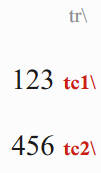
केस 1 यदि संख्याएँ सीधे सेल मार्कर के बाद आती हैं, तो तालिका सेल पूरी तरह से प्रदर्शित नहीं होता है:
\tr \tc1 123 \tc2 456
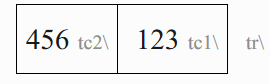
केस 2 यदि एक बाएं-से-दाएं (left-to-right) अक्षर जोड़ा जाता है, तो तालिका सेल सही ढंग से प्रदर्शित होता है, हालांकि एक Number Settings त्रुटि उत्पन्न होती है:
\tr \tc1 [LTR]123 \tc2 [LTR]456
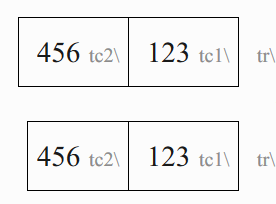
केस 3 यदि एक बाएं-से-दाएं (left-to-right) अक्षर और स्थान (space) जोड़ा जाता है, तो तालिका सेल सही ढंग से प्रदर्शित होता है और कोई त्रुटि उत्पन्न नहीं होती है, हालांकि इससे सेल में अतिरिक्त स्थान जुड़ जाता है। तुलना करें:
\tr \tc1 [LTR] 123 \tc2 [LTR] 456

\tr \tc1 [LTR]123 \tc2 [LTR]456
I am not able to put numbers as the first characters in a table cell in a RTL document without adding unwanted markers and spaces, or getting checking errors. These errors seem to occur using any type of digit following a table cell marker. I want to know: Is this a bug, a feature, or am I doing something wrong?
Case 1 A table cell does not display at all if numbers directly follow the cell marker:
\tr \tc1 123 \tc2 456
Case 2 The table cell displays correctly if a left-to-right character is added, however a Number Settings error is raised:
\tr \tc1 [LTR]123 \tc2 [LTR]456
Case 3 The table cell displays correctly and no error is raised if a left-to-right character and space is added, however this adds extra space to the cell. C.f.:
\tr \tc1 [LTR] 123 \tc2 [LTR] 456

\tr \tc1 [LTR]123 \tc2 [LTR]456








