anon570831,以及任何遇到同样问题的人:
你的逐词对照数据存储在数据库中,并带有词义的语言标签。你可以查看你的 Paratext 项目目录,看看你现有的逐词对照数据使用了什么语言代码来标记词义。Paratext 创建一个名为 Interlinear_XYZ 的子目录来存储标记信息,其中 XYZ 是语言代码。你可能有多个:
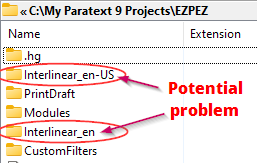
拥有多个文件夹很常见。你可能在一个项目中使用英语词义,在另一个项目中使用西班牙语词义。但当你有一个或多个英语变体(en-US, en-UK, en)时,即使它们都是英语,这些也会单独存储。如上图中所示,拥有两个英语数据库可能表明存在问题。
如果你有两个 interlinear_XYZ 目录,并且不知道哪个是你一直在使用的语言代码,只需打开每个目录,看看哪个包含更多文件,并且日期更早。在顶部的屏幕截图中,Interlinear_en 文件夹中只有一个文件,大小仅为 500 字节。另一个文件夹包含多个书卷,文件大小较大。显然,如果我想看到我的词义,我在设置逐词对照时需要选择 en-US 作为语言。
假设在升级到 9.2 并重新打开逐词对照后,你所有的词义都丢失了。如果你还没有在新的逐词对照中工作,但注意到词义丢失,这里可能只显示一个目录,假设它是 en-US。这是你一直在使用的语言标签。要再次看到你的词义,你需要通过以下两种方式之一创建一个新的逐词对照:
- 创建一个没有模型文本的逐词对照,并选择 en-US 作为语言。
或者
- 创建一个模型文本为 en-US 的逐词对照。你可以在 Open Resource(打开资源)对话框中看到模型文本的语言:

无论哪种方式,当你重新打开逐词对照时,你都会看到丢失的词义。
anon570831, and anyone who stops by with the same issue:
Your interlinear data is stored in the database and tagged with the language of the glosses. You can look in your Paratext project directory to see what language code(s) your existing interlinear has been tagging the glosses with. Paratext creates a subdirectory to store the tagging information that is called Interlinear_XYZ where XYZ is the language code. You may have more than one:
It is common to have more than one folder. You may have glosses in English in one project and in Spanish in another project. But when you have one or more variants of English (en-US, en-UK, en), these are also stored separately, even if they are all English. Having two english databases, as indicated in the image above can indicate a problem.
If you have two interlinear_XYZ directories and don’t know which is the language code you have been using, just open each directory and see which one has more files, and with past dates. In the screenshot at top, the Interlinear_en folder had only one file in it that was only 500bytes in size. The other one had multiple books with larger file sizes. Clearly, en-US is the language I need to select when setting up the interlinear if I want to see my glosses back.
Let’s say that all your glosses went missing after upgrading to 9.2 and reopening the interlinear. If you haven’t worked yet in the new interlinear, but noticed your glosses were missing, you will probably only have one directory showing here, lets say it is en-US. This is the one with the language tag you have been using. To see your glosses again, you will need to create a new interlinear in one of two ways:
- Create an interlinear with no model text, and select en-US as the language.
OR
- Create an interlinear with a model text that is en-US. You can see the language of the model text in the Open Resource dialog:
Either way, you will see your missing glosses when you re-open the interlinear.
机器翻译自 English








