anon570831, e qualquer pessoa que passar por aqui com o mesmo problema:
Seus dados interlineares são armazenados no banco de dados e marcados com o idioma das glosses. Você pode olhar no diretório do seu projeto Paratext para ver com qual código de idioma(s) seu interlinear existente tem marcado as glosses. O Paratext cria um subdiretório para armazenar as informações de marcação chamado Interlinear_XYZ, onde XYZ é o código do idioma. Você pode ter mais de um:
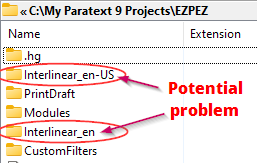
É comum ter mais de uma pasta. Você pode ter glosses em inglês em um projeto e em espanhol em outro projeto. Mas quando você tem uma ou mais variantes de inglês (en-US, en-UK, en), estas também são armazenadas separadamente, mesmo que todas sejam em inglês. Ter dois bancos de dados em inglês, como indicado na imagem acima, pode indicar um problema.
Se você tem dois diretórios interlinear_XYZ e não sabe qual é o código do idioma que tem sido usado, basta abrir cada diretório e ver qual tem mais arquivos e com datas anteriores. Na captura de tela acima, a pasta Interlinear_en tinha apenas um arquivo de apenas 500 bytes. O outro tinha vários livros com tamanhos de arquivo maiores. Claramente, en-US é o idioma que preciso selecionar ao configurar o interlinear se eu quiser ver minhas glosses de volta.
Suponha que todas as suas glosses tenham desaparecido após a atualização para o 9.2 e a reabertura do interlinear. Se você ainda não trabalhou no novo interlinear, mas percebeu que suas glosses estavam ausentes, provavelmente você terá apenas um diretório mostrado aqui, digamos que seja en-US. Este é o que tem a etiqueta de idioma que você tem usado. Para ver suas glosses novamente, você precisará criar um novo interlinear de uma das duas maneiras:
- Crie um interlinear sem texto modelo e selecione en-US como o idioma.
OU
- Crie um interlinear com um texto modelo que seja en-US. Você pode ver o idioma do texto modelo no diálogo Abrir Recurso:

De qualquer forma, você verá suas glosses ausentes quando reabrir o interlinear.
anon570831, and anyone who stops by with the same issue:
Your interlinear data is stored in the database and tagged with the language of the glosses. You can look in your Paratext project directory to see what language code(s) your existing interlinear has been tagging the glosses with. Paratext creates a subdirectory to store the tagging information that is called Interlinear_XYZ where XYZ is the language code. You may have more than one:
It is common to have more than one folder. You may have glosses in English in one project and in Spanish in another project. But when you have one or more variants of English (en-US, en-UK, en), these are also stored separately, even if they are all English. Having two english databases, as indicated in the image above can indicate a problem.
If you have two interlinear_XYZ directories and don’t know which is the language code you have been using, just open each directory and see which one has more files, and with past dates. In the screenshot at top, the Interlinear_en folder had only one file in it that was only 500bytes in size. The other one had multiple books with larger file sizes. Clearly, en-US is the language I need to select when setting up the interlinear if I want to see my glosses back.
Let’s say that all your glosses went missing after upgrading to 9.2 and reopening the interlinear. If you haven’t worked yet in the new interlinear, but noticed your glosses were missing, you will probably only have one directory showing here, lets say it is en-US. This is the one with the language tag you have been using. To see your glosses again, you will need to create a new interlinear in one of two ways:
- Create an interlinear with no model text, and select en-US as the language.
OR
- Create an interlinear with a model text that is en-US. You can see the language of the model text in the Open Resource dialog:
Either way, you will see your missing glosses when you re-open the interlinear.
Tradução automática de English








