请注意此打印屏幕的最底行:
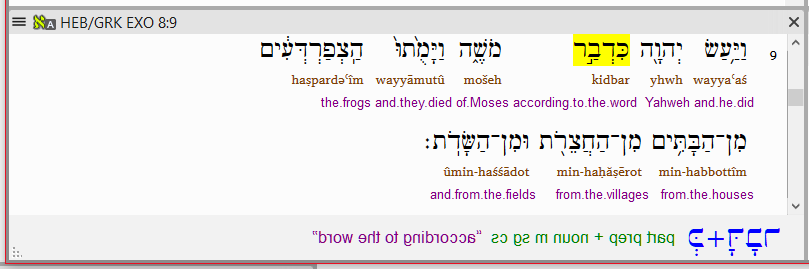
image809×269 16.2 KB
您是否也遇到过这种情况?
在查看希伯来文/希腊文资源中的经文时,“Word Info”部分的文本有时会以镜像形式显示。(我大部分时间都在处理旧约——我不确定新约中是否也会出现这种情况。)
自从我开始使用 Paratext 7 版本以来,我就偶尔观察到这种行为。我不确定是什么触发了它。我之前提交过错误报告,但看起来问题尚未被确定。我想知道这是否只发生在我身上,还是其他人也观察到了这种行为。
可以通过点击资源菜单,取消选择“Word Info”,然后重新选择它来修复。这是修正后的窗口:
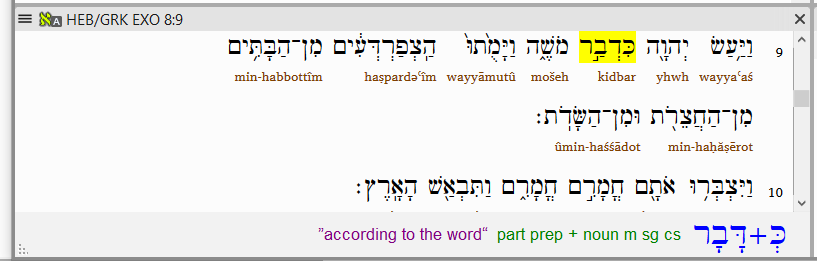
image817×261 17 KB
谢谢!
Note the very bottom line in this printescreen:
image809×269 16.2 KB
Has this ever happened to you?
The text in the “Word Info” section sometimes shows up mirrored when looking at passages in the HEB/GRK resource. (I spend most of my time in the OT- I don’t know if it also happens in the NT.)
I’ve been observing this behavior occasionally ever since I started using Paratext in version 7. I’m not sure what triggers it. I’ve made a bug report before, but it looks like the problem hasn’t been identified. I’m interested to know if this only happens to me, or if other people have observed the behavior.
It can be fixed by clicking on the resource’s menu, unselecting “Word Info”, and reselecting it. Here is the window again, corrected:
image817×261 17 KB
Thanks!
机器翻译自 English








