我沒有較舊版本的 TOB。但更好的做法是讓 Paratext 自動標記詞彙表中的詞彙,方法是使用「Biblical Terms」(聖經術語)清單中的「Glossary」(詞彙表)功能。一旦您將詞彙表連結到您的聖經術語清單,您就可以前往詞彙表中的「Link Selected Renderings」(連結選定的譯法)……
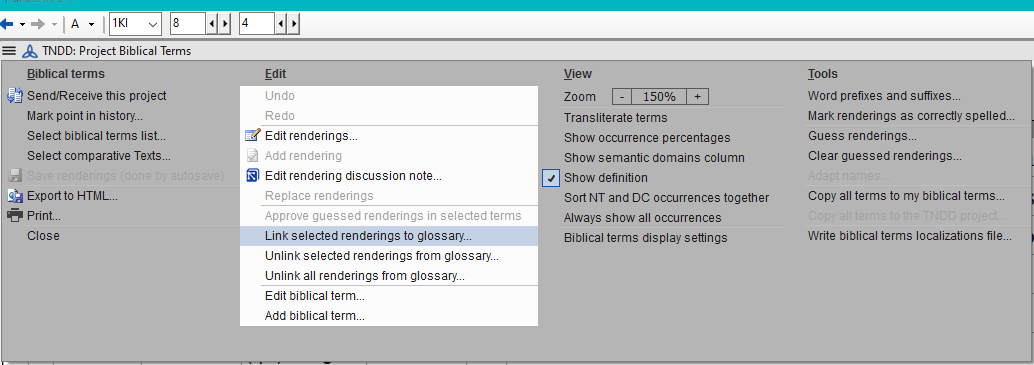
image1034×365 24.3 KB
每個聖經術語都有兩個分頁,當您開啟該術語進行編輯時。一個是「Term Rendering」(術語譯法)(該術語如何翻譯成您的語言),另一個是「Glossary」(詞彙表)- 請參閱下圖:
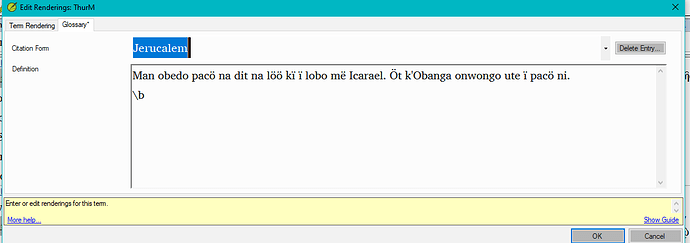
image1136×401 12.4 KB
如果您需要進一步的幫助,請透過我的電子郵件地址 - [Email Removed] 或我的 Skype 名稱 anon758749 與我聯繫。
I don’t have an older version of TOB. But the better way to do this, would be to have Paratext do the marking of glossary words automatically, using the Glossary feature in the Biblical Terms list. Once you have your glossary linked to your biblical terms list, you can then go to Link Selected Renderings in glossary…
image1034×365 24.3 KB
Each biblical term has two tabs, once you open the term for editing. One is for the Term Rendering (how the term is being translated into your language), and the second is for the Glossary - see picture below:
image1136×401 12.4 KB
If you would like further help, contact me via my email address - [Email Removed] or my Skype name, anon758749.
機器翻譯自 English








