У меня нет старой версии TOB. Но лучший способ сделать это — позволить Paratext автоматически отмечать слова глоссария, используя функцию Glossary в списке Biblical Terms. Как только вы свяжете свой глоссарий со списком библейских терминов, вы можете перейти к Link Selected Renderings в глоссарии…
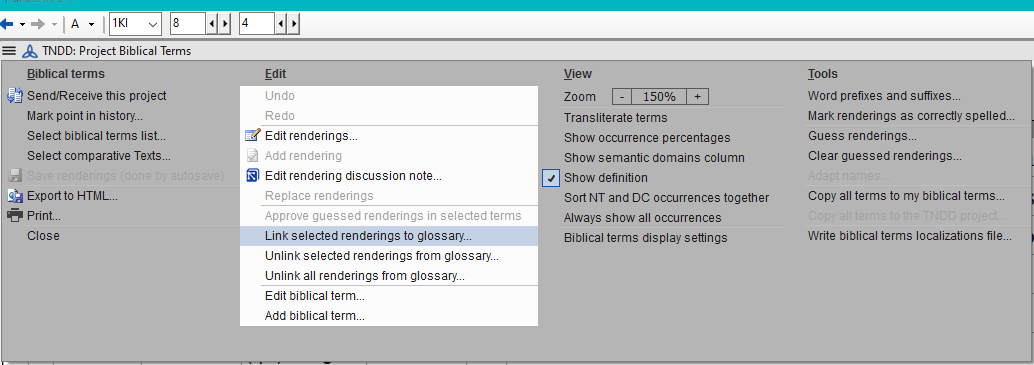
image1034×365 24.3 KB
У каждого библейского термина есть две вкладки, когда вы открываете термин для редактирования. Одна — для Term Rendering (как термин переводится на ваш язык), а вторая — для Glossary — см. изображение ниже:
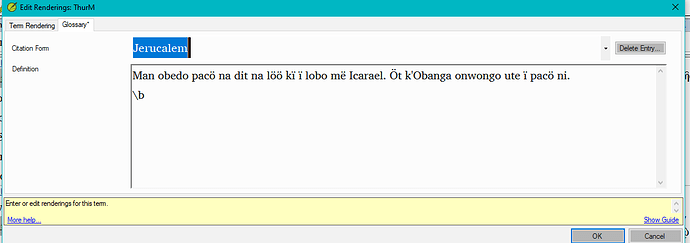
image1136×401 12.4 KB
Если вам нужна дополнительная помощь, свяжитесь со мной по моему адресу электронной почты - [Email Removed] или по моему имени в Skype, anon758749.
I don’t have an older version of TOB. But the better way to do this, would be to have Paratext do the marking of glossary words automatically, using the Glossary feature in the Biblical Terms list. Once you have your glossary linked to your biblical terms list, you can then go to Link Selected Renderings in glossary…
image1034×365 24.3 KB
Each biblical term has two tabs, once you open the term for editing. One is for the Term Rendering (how the term is being translated into your language), and the second is for the Glossary - see picture below:
image1136×401 12.4 KB
If you would like further help, contact me via my email address - [Email Removed] or my Skype name, anon758749.
Переведено машиной с языка English








