Paratext 專案中的語言 ID 必須與 FLEx 專案中本族語(vernacular language)的語言 ID 相符。此 ID 是該語言的兩個或三個字母代碼,加上修飾符。
這是一個簡單代碼的匹配示例:在 FLEx 中(工具 > 設定 > 設定本族語書寫系統)
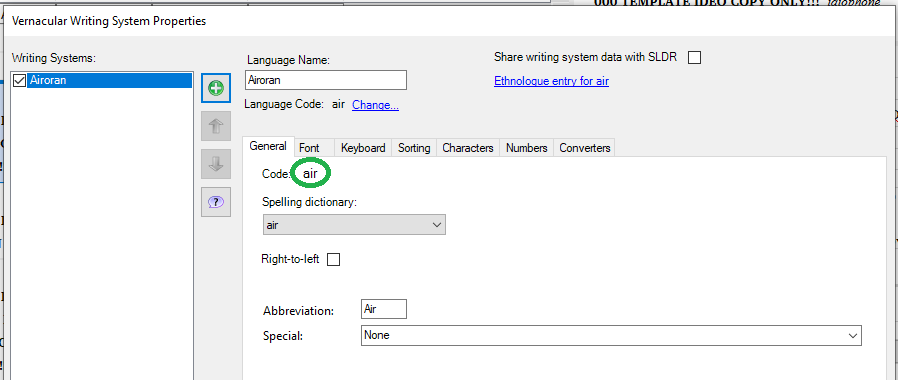
image898×380 13.6 KB
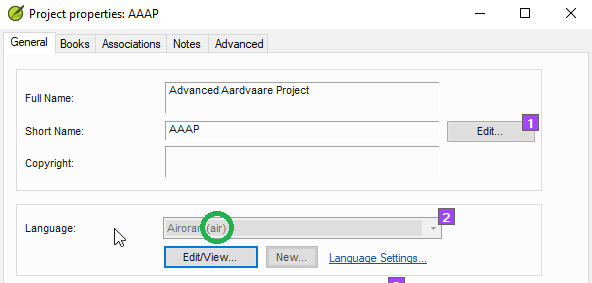
在 Paratext 專案屬性中:
如果語言 ID 包含修飾符,例如書寫系統、地區或變體的指定,您需要在兩個程式的語言 ID 中添加相同的修飾符。您可以在 Paratext 的語言識別碼對話方塊的進階部分執行此操作。
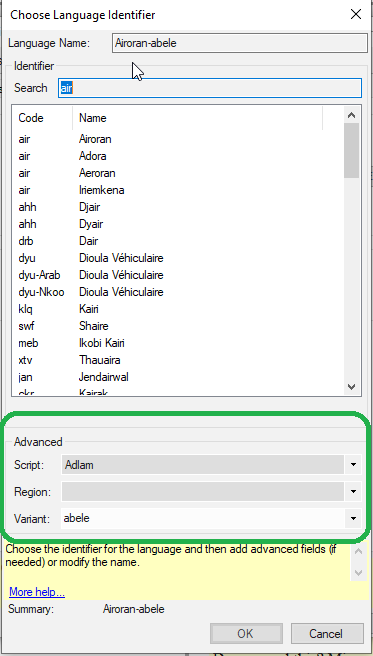
image373×656 12.5 KB
(但如果專案已註冊,您可能必須在專案登錄中更改此設定)。
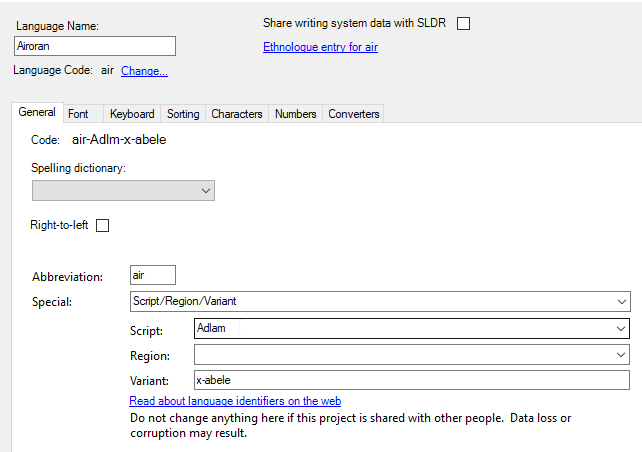
在 Fieldworks 中,您可以透過點擊底部的「特殊」,然後指定所需的選項,在本族語書寫系統屬性中執行此操作。
如果一個程式添加了修飾符而另一個程式沒有,如果您想要更簡單的代碼,可以從其中一個程式中移除修飾符。
要從 Fieldworks 中移除修飾符,請前往本族語書寫系統屬性,點擊「特殊」並選擇「無」。
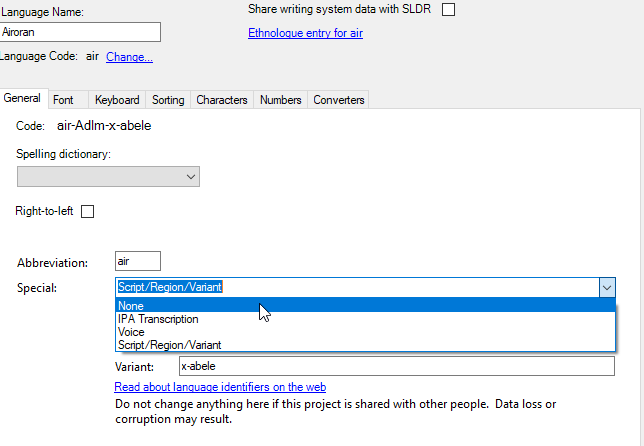
要從 Paratext 或 Paratext 登錄中移除修飾符,請開啟列表並選擇空白選項以移除選定的變體。
The language ID in the Paratext project has to match the language ID in the vernacular language in the FLEx project. This ID is the two or three letter code for the language, plus modifiers.
Here is a match of a simple code: in FLEx (Tools > Configure > Setup Vernacular Writing Systems)
image898×380 13.6 KB
In Paratext project properties:
If the language ID has modifiers like the designation for a script or region or variant, you need to add the same modifiers to the language ID in both programs. You can do this in Paratext in the advanced section of the language identifier dialog.
image373×656 12.5 KB
(But if the project is registered, you likely will have to change this in the project registry).
In Fieldworks, you can do this in the vernacular writing system properties by clicking in “Special” at the bottom, then specifying the needed options.
If one program adds modifiers and the other program does not, you can remove the modifiers from one program if you want the simpler code.
To remove modifiers from Fieldworks, go to the vernacular writing system properties, click in “Special” and choose “None.”
To remove modifiers from Paratext, or the Paratext registry, remove the selected variants by opening the list and choosing the blank option.
機器翻譯自 English








