ID bahasa dalam proyek Paratext harus cocok dengan ID bahasa dalam bahasa vernakular di proyek FLEx. ID ini adalah kode dua atau tiga huruf untuk bahasa tersebut, ditambah modifikator.
Berikut adalah contoh kecocokan kode sederhana: di FLEx (Tools > Configure > Setup Vernacular Writing Systems)
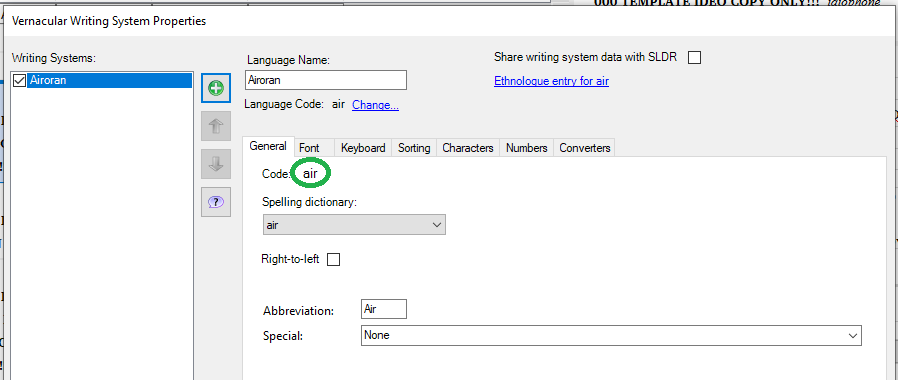
image898×380 13.6 KB
Di properti proyek Paratext:
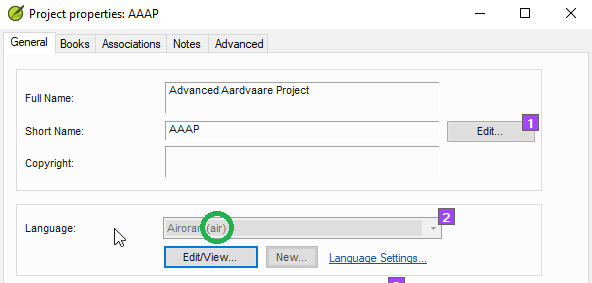
Jika ID bahasa memiliki modifikator seperti penunjukan untuk aksara, wilayah, atau varian, Anda perlu menambahkan modifikator yang sama ke ID bahasa di kedua program. Anda dapat melakukan ini di Paratext di bagian lanjutan dari dialog pengidentifikasi bahasa.
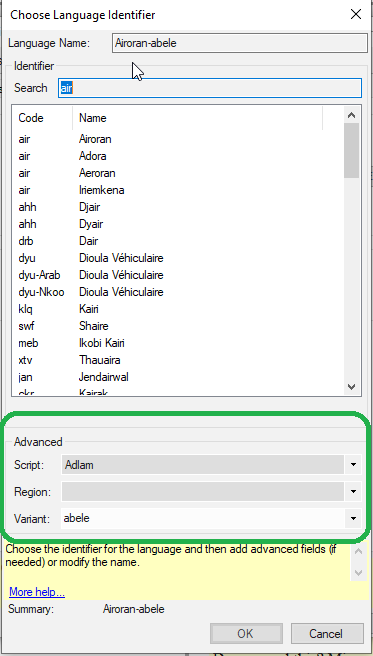
image373×656 12.5 KB
(Tapi jika proyek tersebut terdaftar, kemungkinan Anda harus mengubah ini di registri proyek).
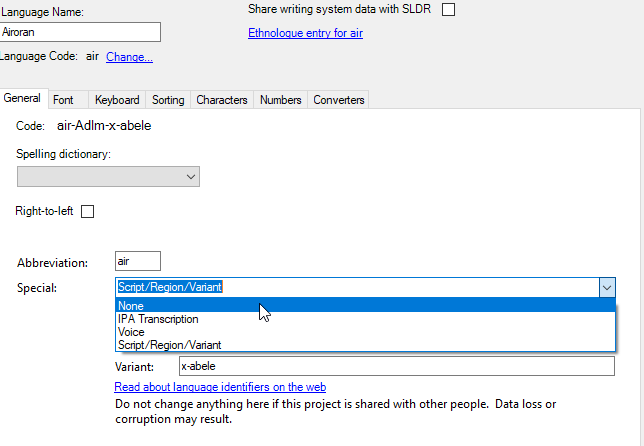
Di Fieldworks, Anda dapat melakukan ini di properti sistem penulisan vernakular dengan mengklik “Special” di bagian bawah, lalu menentukan opsi yang diperlukan.
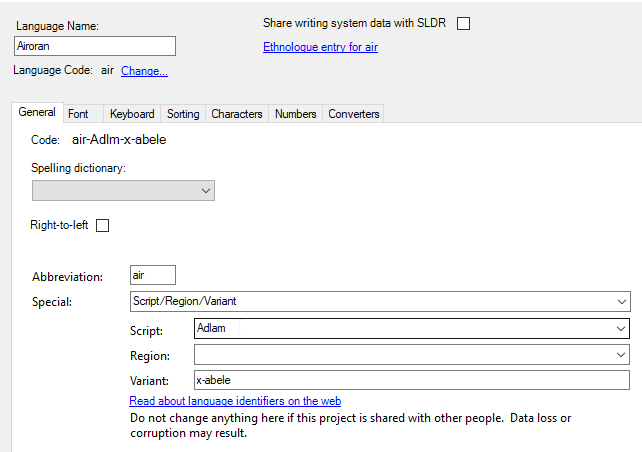
Jika satu program menambahkan modifikator dan program lainnya tidak, Anda dapat menghapus modifikator dari salah satu program jika Anda menginginkan kode yang lebih sederhana.
Untuk menghapus modifikator dari Fieldworks, buka properti sistem penulisan vernakular, klik “Special” dan pilih “None.”
Untuk menghapus modifikator dari Paratext, atau registri Paratext, hapus varian yang dipilih dengan membuka daftar dan memilih opsi kosong.
The language ID in the Paratext project has to match the language ID in the vernacular language in the FLEx project. This ID is the two or three letter code for the language, plus modifiers.
Here is a match of a simple code: in FLEx (Tools > Configure > Setup Vernacular Writing Systems)
image898×380 13.6 KB
In Paratext project properties:
If the language ID has modifiers like the designation for a script or region or variant, you need to add the same modifiers to the language ID in both programs. You can do this in Paratext in the advanced section of the language identifier dialog.
image373×656 12.5 KB
(But if the project is registered, you likely will have to change this in the project registry).
In Fieldworks, you can do this in the vernacular writing system properties by clicking in “Special” at the bottom, then specifying the needed options.
If one program adds modifiers and the other program does not, you can remove the modifiers from one program if you want the simpler code.
To remove modifiers from Fieldworks, go to the vernacular writing system properties, click in “Special” and choose “None.”
To remove modifiers from Paratext, or the Paratext registry, remove the selected variants by opening the list and choosing the blank option.








