Идентификатор языка в проекте Paratext должен совпадать с идентификатором языка в языке оригинала в проекте FLEx. Этот идентификатор — это код языка из двух или трех букв, плюс модификаторы.
Вот пример совпадения простого кода: в FLEx (Tools > Configure > Setup Vernacular Writing Systems)
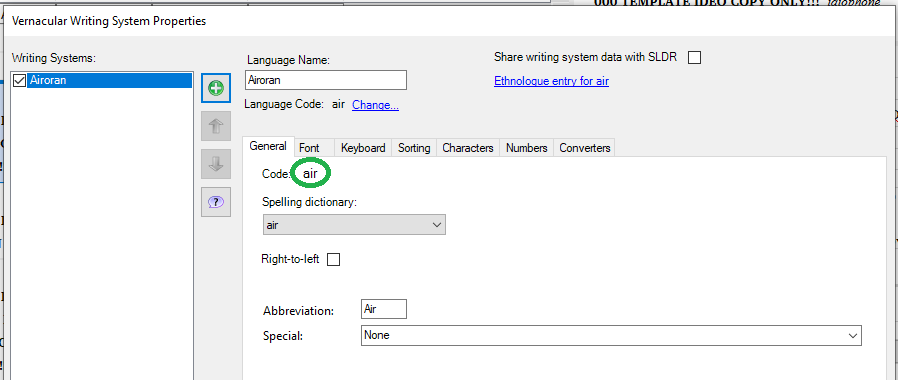
image898×380 13.6 KB
В свойствах проекта Paratext:
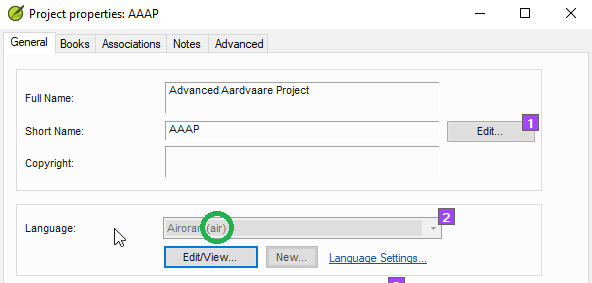
Если идентификатор языка содержит модификаторы, такие как обозначение письма, региона или варианта, вам нужно добавить те же модификаторы к идентификатору языка в обеих программах. В Paratext вы можете сделать это в расширенной части диалогового окна идентификатора языка.
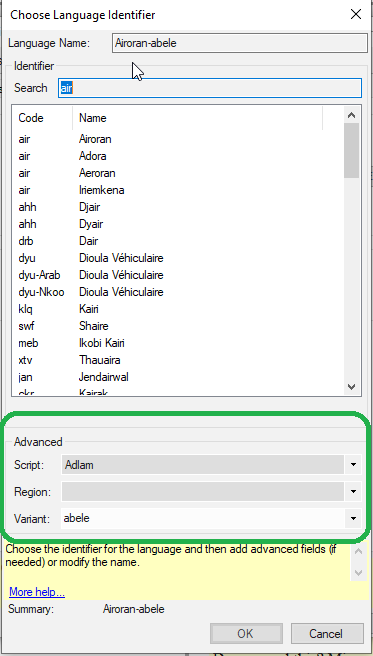
image373×656 12.5 KB
(Но если проект зарегистрирован, вам, вероятно, придется изменить это в реестре проекта).
В Fieldworks вы можете сделать это в свойствах системы письма языка оригинала, нажав «Special» внизу, а затем указав необходимые параметры.
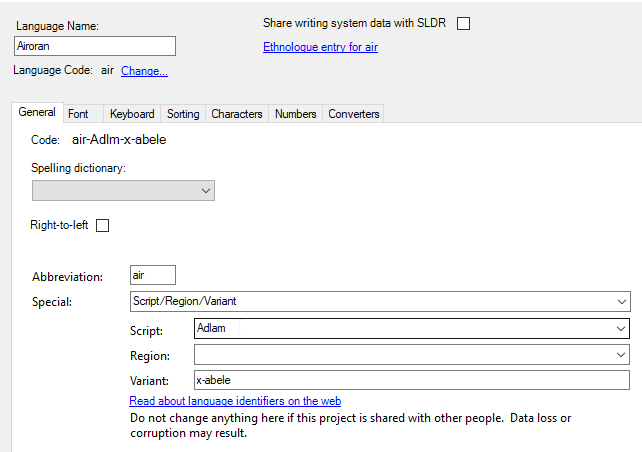
Если одна программа добавляет модификаторы, а другая — нет, вы можете удалить модификаторы из одной программы, если хотите использовать более простой код.
Чтобы удалить модификаторы из Fieldworks, перейдите в свойства системы письма языка оригинала, нажмите «Special» и выберите «None».
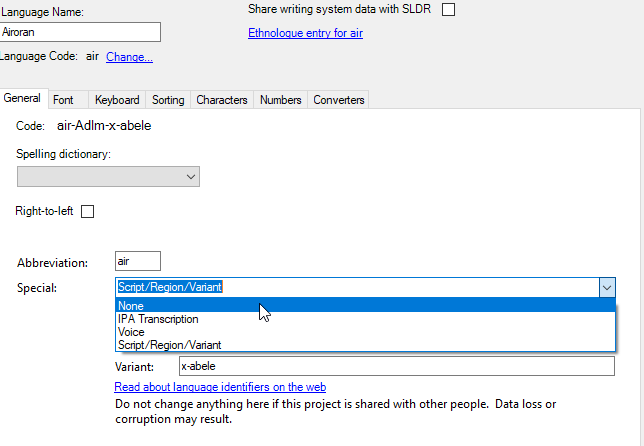
Чтобы удалить модификаторы из Paratext или реестра Paratext, удалите выбранные варианты, открыв список и выбрав пустой вариант.
The language ID in the Paratext project has to match the language ID in the vernacular language in the FLEx project. This ID is the two or three letter code for the language, plus modifiers.
Here is a match of a simple code: in FLEx (Tools > Configure > Setup Vernacular Writing Systems)
image898×380 13.6 KB
In Paratext project properties:
If the language ID has modifiers like the designation for a script or region or variant, you need to add the same modifiers to the language ID in both programs. You can do this in Paratext in the advanced section of the language identifier dialog.
image373×656 12.5 KB
(But if the project is registered, you likely will have to change this in the project registry).
In Fieldworks, you can do this in the vernacular writing system properties by clicking in “Special” at the bottom, then specifying the needed options.
If one program adds modifiers and the other program does not, you can remove the modifiers from one program if you want the simpler code.
To remove modifiers from Fieldworks, go to the vernacular writing system properties, click in “Special” and choose “None.”
To remove modifiers from Paratext, or the Paratext registry, remove the selected variants by opening the list and choosing the blank option.








