El ID de idioma en el proyecto de Paratext debe coincidir con el ID de idioma en el idioma vernáculo del proyecto de FLEx. Este ID es el código de dos o tres letras para el idioma, más modificadores.
Aquí hay una coincidencia de un código simple: en FLEx (Tools > Configure > Setup Vernacular Writing Systems)
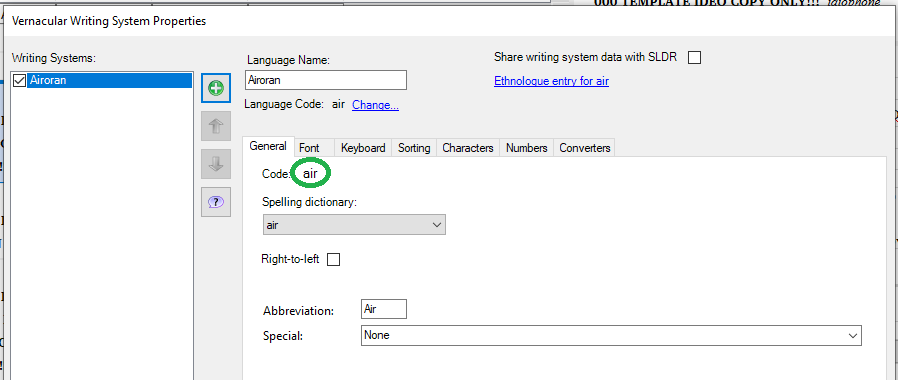
imagen898×380 13.6 KB
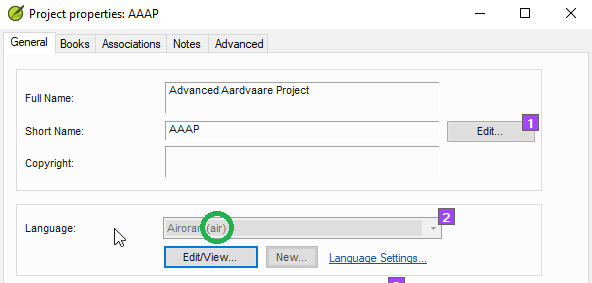
En las propiedades del proyecto de Paratext:
Si el ID de idioma tiene modificadores como la designación para un sistema de escritura, región o variante, necesita agregar los mismos modificadores al ID de idioma en ambos programas. Puede hacer esto en Paratext en la sección avanzada del cuadro de diálogo del identificador de idioma.
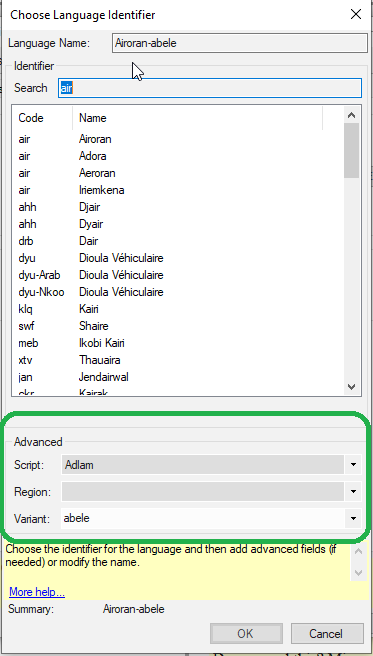
imagen373×656 12.5 KB
(Pero si el proyecto está registrado, probablemente tendrá que cambiar esto en el registro del proyecto).
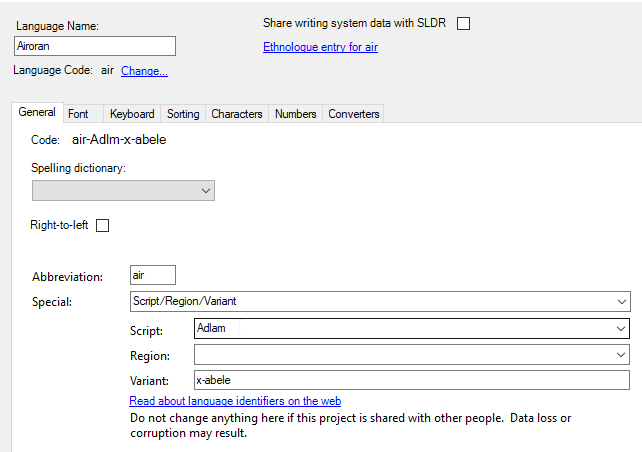
En Fieldworks, puede hacer esto en las propiedades del sistema de escritura vernáculo haciendo clic en “Special” en la parte inferior y luego especificando las opciones necesarias.
Si un programa agrega modificadores y el otro no, puede eliminar los modificadores de un programa si desea el código más simple.
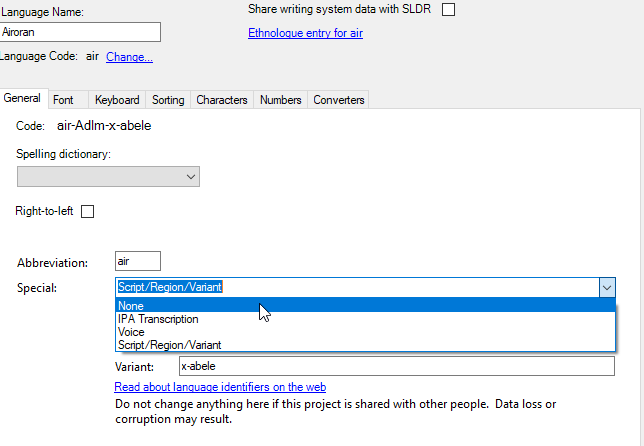
Para eliminar modificadores de Fieldworks, vaya a las propiedades del sistema de escritura vernáculo, haga clic en “Special” y elija “None.”
Para eliminar modificadores de Paratext, o del registro de Paratext, elimine las variantes seleccionadas abriendo la lista y eligiendo la opción en blanco.
The language ID in the Paratext project has to match the language ID in the vernacular language in the FLEx project. This ID is the two or three letter code for the language, plus modifiers.
Here is a match of a simple code: in FLEx (Tools > Configure > Setup Vernacular Writing Systems)
image898×380 13.6 KB
In Paratext project properties:
If the language ID has modifiers like the designation for a script or region or variant, you need to add the same modifiers to the language ID in both programs. You can do this in Paratext in the advanced section of the language identifier dialog.
image373×656 12.5 KB
(But if the project is registered, you likely will have to change this in the project registry).
In Fieldworks, you can do this in the vernacular writing system properties by clicking in “Special” at the bottom, then specifying the needed options.
If one program adds modifiers and the other program does not, you can remove the modifiers from one program if you want the simpler code.
To remove modifiers from Fieldworks, go to the vernacular writing system properties, click in “Special” and choose “None.”
To remove modifiers from Paratext, or the Paratext registry, remove the selected variants by opening the list and choosing the blank option.








