也许我可以在此提供一些帮助。
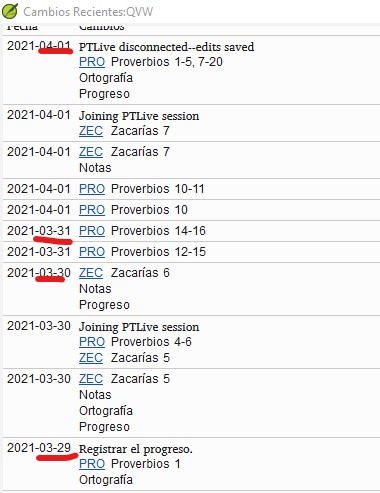
虽然您不会看到“执行 Send/Receive(发送/接收)”事件的历史记录条目,但您可以查明对文本或工具进行更改的日期。在我看来,这正是您需要的信息。
例如,如果某人直到 5 天后才执行 s/r,不幸的是,您将无法获得他们那 5 天的工作信息,但无论如何,当这次 s/r 完成时,您将拥有所有这些更改以及它们在那 5 天内发生更改的日期。如果第 1 天编辑了某个经文,或者第 3 天修改了 Word List(词汇表)等。
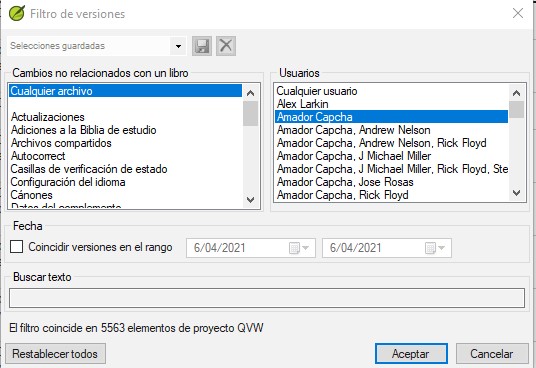
History(历史记录)还提供了按用户、日期和工具进行筛选的选项。
通常,建议团队在每个工作日的开始和结束都执行一次 s/r。如果他们能访问互联网,这将有助于您保持信息的最新状态。但即使他们不能,经常通过 USB 或 chorus 进行 s/r 也很有价值。
Maybe I can contribute here.
While you won’t get a history entry for the “make a send/receive” event, you can find out the day a change was made to the text or tools. Which seems to me to be the information you need.
For example, if someone doesn’t do an s/r until after 5 days, unfortunately you won’t have information on their work those 5 days, but anyway when this s/r is done, you will have all the changes and the dates they were made during those 5 days. If a verse was edited on day 1, or the Word List was modified on day 3, etc.
The History also offers you filtering options by user, date and tool.
In general, it is recommended that teams do an s/r at the beginning and end of each workday. If they have access to the Internet, this will allow you to keep the information up to date. But even if they don’t, constant s/r to a usb or with chorus are valuable.
机器翻译自 English








