Ya, Paratext 9 menampilkan fitur font OpenType yang ditentukan, tetapi GUI untuk memilih/menentukan fitur rusak?? (Detail di sini... pengeditan daftar fitur tersedia di PT Lite!)
Beberapa tahun lalu, versi 6 dari font SIL--Charis, Gentium, Andika, Doulos--beralih dari Graphite ke OpenType untuk mengakses Fitur Font, atau "glikf alternatif." Sejak saat itu, daftar pemilihan Fitur Font Paratext berfungsi untuk v. 5 dari font mana pun, tetapi jika sistem Anda memiliki v. 6, tombol "Choose" menjadi abu-abu, seperti pada tangkapan layar.
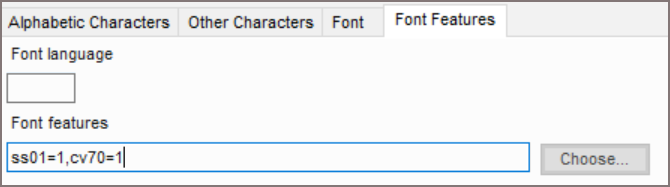
Namun, saya memutuskan untuk memeriksa proyek Paratext saya sendiri. Saya terkejut melihat kode OpenType untuk LiteracyAlternates=off dan GlottalStop=large sudah diketik ke dalam kotak teks Fitur Font, seperti yang ditunjukkan tangkapan layar. Fitur-fitur ini ditampilkan dengan benar di proyek Paratext saya--di PT9 dan juga di PT Lite--Android dan --Desktop-Linux. Namun, secara mengejutkan, saya tidak dapat mengedit daftar fitur yang ditampilkan di PT 9, maupun menambahkan spesifikasi fitur ke proyek lain. Pilihan fitur saya hanya "ada dan berfungsi" di PT9.
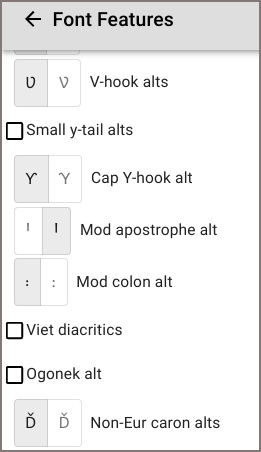
Paratext Lite (versi Beta untuk desktop Linux), bagaimanapun, menyediakan layar pengeditan fitur font OpenType grafis yang paling mudah digunakan yang pernah saya lihat--jauh lebih baik daripada LibreOffice! Apresiasi untuk tim PTLite!
Pengaturan Bahasa PT9:
Pengaturan Bahasa PTLite > Edit Font Features (cuplikan):
Yes, Paratext 9 displays specified OpenType font features, but the GUI for selecting/specifying features is broken?? (Details here... editing the feature list is available in PT Lite!)
A few years ago version 6 of the SIL fonts--Charis, Gentium, Andika, Doulos--switched from Graphite to OpenType for accessing Font Features, or "alternate glyphs." Since then Paratext's Font Features selection list works for v. 5 of any of these fonts but if your system has v. 6 the "Choose" button is greyed out, as in the screenshot.
However, I decided to check out my own Paratext project. I was surprised to see the OpenType codes for LiteracyAlternates=off and GlottalStop=large already typed into the Font Features text box, as the screenshot shows. These features are displaying correctly in my Paratext projects--in PT9 and also in PT Lite--Android and --Desktop-Linux. Surprisingly though, I can not edit the pictured feature list in PT 9, nor add feature specs into other projects. My feature choices are just "present and working" in PT9.
Paratext Lite (Beta version for Linux desktop), however, provides the easiest-to-use OpenType graphical font feature editing screen that I've seen--much better than LibreOffice! Kudos to the PTLite team!
PT9 Language Settings:
PTLite Language Settings > Edit Font Features (snippet):








