再次說明,如果您在發送的檔案中包含 PSA(請參閱之前的問題),我可以嘗試為您解讀此錯誤。有時報告的行號會「偏差」幾行,因此值得查看周圍的上下文,看看第 5386 行附近是否有導致問題的內容。
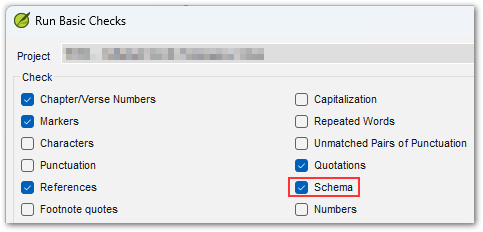
另一個有時有助於發現 USFM 錯誤的方法是 Paratext 中的 Schema 檢查,它會更深入地檢查數據結構。作為一項特殊的技術檢查,只有在您按住 SHIFT 鍵並點擊專案選單中的「Run basic checks...」時,它才會顯示。
Once again, if you include PSA in the archive you send in (see previous issue), then I can try to decipher this error for you. Sometimes the line number reported is "off" by a few lines, so it is worth looking at the surrounding context to see if there is anything tripping it up near line 5386.
Another thing that sometimes helps discover errors in the USFM is the Schema check in Paratext which takes a deeper dive into examining the structure of your data. As a special technical check, it only shows up if you're holding SHIFT when you click "Run basic checks..." on the Project menu.
機器翻譯自 English








