再次说明,如果您在发送的存档中包含 PSA(参见之前的问题),我可以尝试为您解读此错误。有时报告的行号会“偏差”几行,因此值得查看第 5386 行附近的上下文,看看是否有导致问题的内容。
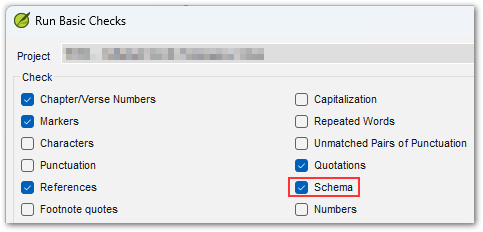
另一个有时有助于发现 USFM 中错误的方法是 Paratext 中的 Schema 检查,它会更深入地检查数据结构。作为一种特殊的技术检查,只有在您按住 SHIFT 键并点击“Project”菜单中的“Run basic checks...”时,它才会显示出来。
Once again, if you include PSA in the archive you send in (see previous issue), then I can try to decipher this error for you. Sometimes the line number reported is "off" by a few lines, so it is worth looking at the surrounding context to see if there is anything tripping it up near line 5386.
Another thing that sometimes helps discover errors in the USFM is the Schema check in Paratext which takes a deeper dive into examining the structure of your data. As a special technical check, it only shows up if you're holding SHIFT when you click "Run basic checks..." on the Project menu.
机器翻译自 English








