嗯。我認為現在不建議要求翻譯必須使用特定的字體。如果它使用二合符號(兩個點)的代碼點並將其顯示為波浪號,那麼這可能甚至是一個 Unicode 之前或僅半 Unicode 的字體。
因此,我建議您將整個專案的底層文本轉換為真正的 Unicode。這裡或 Paratext 網站上可能有人可以幫助您完成此操作。
但是,讓我們假設出於美學原因,您需要使用一個特定的字體,而該字體對某些字母使用了錯誤的字形。
啟用完整選單後,您會看到進階標籤頁,您會看到一個應該設定的核取方塊,「Apply changes.txt」:
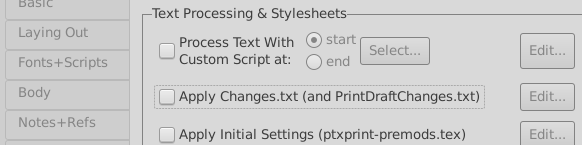
在該文件中(點擊編輯),您可以應用常規更改,每行一個,並且還可以將更改限制在單一節。
基本格式是 "old" > "new",您可以透過在數字前加上 \u 來指定 Unicode 代碼點。例如:
"dh" > "ð"
"th" > "θ"
"\uA78C" > "\u0027"
Hmm. I don’t think it’s recommended to require a specific font for a translation these days. It sounds like it might even be a pre-unicode or only semi-unicode font if it is using a code-point for dieresis (2 dots) and showing it as a tilde.
I would therefore encourage you to make the underlying text of the whole project into true unicode. Probably there are people here or on the Paratext site who can help you do that.
But, let us assume that for aesthetic reasons you need to use a specific font, which is using the wrong glyphs for certain letters.
Enabling full menus, you will see the advanced tab, you will see a checkbox you should set, ‘Apply changes.txt’:
In that file (click on edit), you can apply regular changes, one per line, and also restrict the change to just a single verse.
The basic format is "old" > "new", you can specify unicode code-points by prefixing the number with \u For example:
"dh" > "ð"
"th" > "θ"
"\uA78C" > "\u0027"
機器翻譯自 English








