Paratext 的傳送/接收(send/receive)功能喜歡使用節號來幫助解決衝突,文件也警告說,因此兩個人同時編輯術語表是危險的。我推測這在術語表中並沒有被明確關閉,只是通常那裡沒有節號。我想針對這個問題提出以下方法:
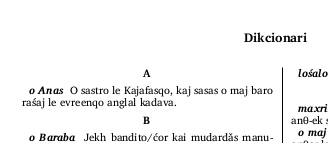
步驟 1:使用節號(這為 Paratext 提供了導航方法)在首字母邊界處分割術語表。
步驟 2:使用 \vp 將數字替換為適當的首字母
例如:
\zglo-s\*
\pc
\v 1 \vp A\vp*
\p
\k o Anas\k* O sastro le Kajafasqo, kaj sasas o maj baro raśaj le evreenqo anglal kadava.
\pc
\v 2 \vp B\vp*
為了格式化,請將整個術語表包含在一個範圍里程碑(ranged milestone)中(我選擇了 \zglo-s....\zglo-e),然後這可以是您的 custom.sty 檔案:
\Marker zglo-s
\Endmarker zglo-e
\Name Glossary section
\Description So special formatting can be applied within glossary
\StyleType Milestone

\Marker v+zglo-s
\Superscript -
\Bold
(上述檔案的最後一部分使里程碑範圍內的「節號」恢復為正常大小並加粗)
Paratext send/receive likes to use verse numbers to help solve conflicts, and the documents warn that 2 people editing the glossary is therefore dangerous. I presume that this is not explicitly turned off for the glossary but just normally there are no verse numbers there. I’d like to suggest this approach to that problem:
Step 1: Split the glossary at initial-letter-boundaries, using verse-numbers (which provide a navigation method for paratext).
Step 2: Use \vp to replace the number with the appropriate initial letters
E.g:
\zglo-s\*
\pc
\v 1 \vp A\vp*
\p
\k o Anas\k* O sastro le Kajafasqo, kaj sasas o maj baro raśaj le evreenqo anglal kadava.
\pc
\v 2 \vp B\vp*
For formatting, enclose the whole glossary in a ranged milestone (I’ve chosen \zglo-s....\zglo-e), and then this could be your custom.sty file:
\Marker zglo-s
\Endmarker zglo-e
\Name Glossary section
\Description So special formatting can be applied within glossary
\StyleType Milestone

\Marker v+zglo-s
\Superscript -
\Bold
(The last part of the file above makes ‘verse numbers’ within the bounds of the milestone normal sized and bold)
機器翻譯自 English








