在“提供反馈”或“报告问题”对话框中,有一个很有用的功能是报告包含 Paratext 日志文件,这通常能提供更多关于发生情况的详细信息。
但如果 Paratext 突然关闭,或者 Windows 提示其已停止工作,当您重新启动 Paratext 并提交问题报告时,Paratext 日志可能不会包含 Paratext 停止时的事件,因为它很可能在有机会保存日志文件之前就已经退出了。
因此,如果您想报告崩溃或突然退出,以下是您可以向我们提供更多技术信息的方法。
在 Windows 中,有一个名为“事件查看器”(Event Viewer)的程序。您可以在开始菜单中搜索它。
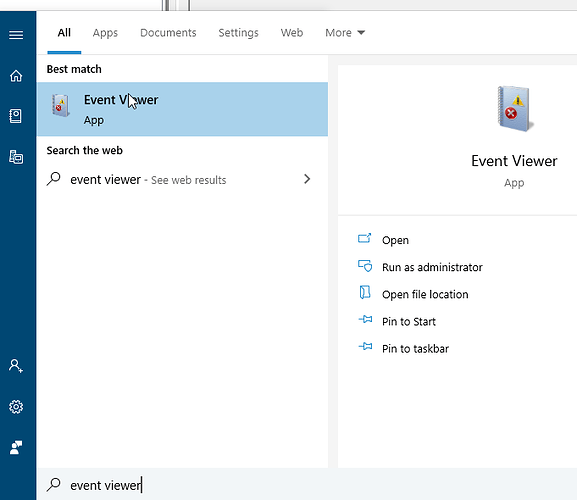
image681×590 19.6 KB
打开“事件查看器”后,在左侧打开“Windows 日志”(WIndows Logs)文件夹并选择“应用程序”(Application)。
现在,在中间的列表中查找标记为“错误”(Error)的条目,看看是否提到了 Paratext。
此示例显示了来自 Paratext 的事件。
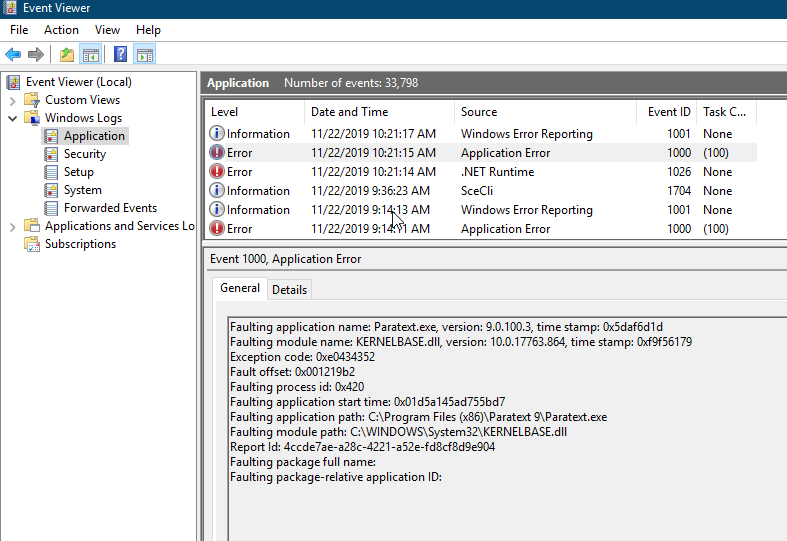
image787×541 32.9 KB
要复制信息发送给我们,请右键单击该条目,选择“复制 > 复制详细信息为文本”(Copy > Copy details as text),然后将其粘贴到您的问题报告中。
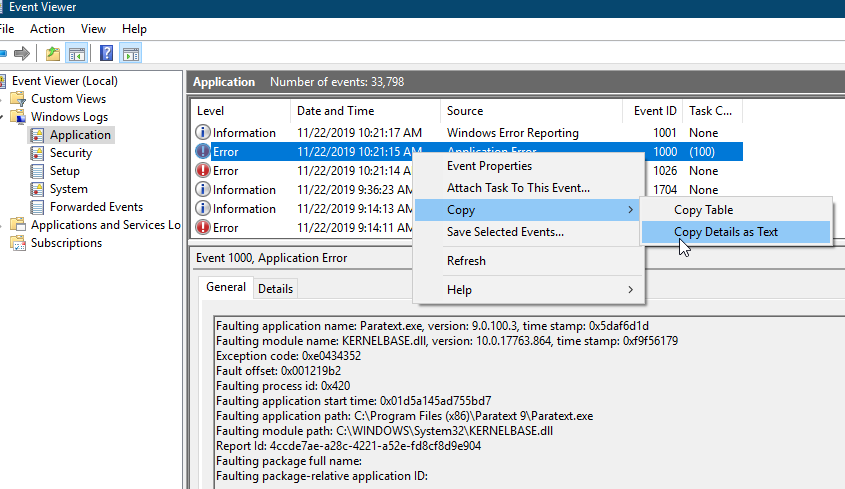
image845×489 34.4 KB
One useful thing in the Give Feedback or Report a Problem dialog is the report includes a Paratext log file which often indicates some more detail about what happened.
But if Paratext suddenly shuts down, or Windows says it has stopped working, if you restart Paratext and submit a problem report, the Paratext log probably will not include the events when Paratext stopped, because it likely exited before it had a change to save the log file.
So if you want to report a crash or sudden exit, here’s how you can give us more technical information.
In Windows, there is a program called Event Viewer. You can search for it in the Start menu.
image681×590 19.6 KB
Once Event viewer opens, open the “WIndows Logs” folder on the left and select Application.
Now look through the list in the middle for something labeled “Error” and see if it mentions Paratext.
This example shows an event from Paratext.
image787×541 32.9 KB
To copy the information to send us, right click on the item, choose “Copy > Copy details as text” then paste that into your problem report.
image845×489 34.4 KB
机器翻译自 English








