Una cosa útil en el cuadro de diálogo Give Feedback or Report a Problem es que el informe incluye un archivo de registro de Paratext, que a menudo indica más detalles sobre lo que ocurrió.
Pero si Paratext se cierra de repente, o Windows indica que ha dejado de funcionar, y reinicia Paratext y envía un informe de problema, es probable que el registro de Paratext no incluya los eventos cuando Paratext se detuvo, porque probablemente se cerró antes de tener la oportunidad de guardar el archivo de registro.
Por lo tanto, si desea informar sobre un error o un cierre repentino, aquí le mostramos cómo puede proporcionarnos más información técnica.
En Windows, hay un programa llamado Event Viewer (Visor de eventos). Puede buscarlo en el menú Inicio.
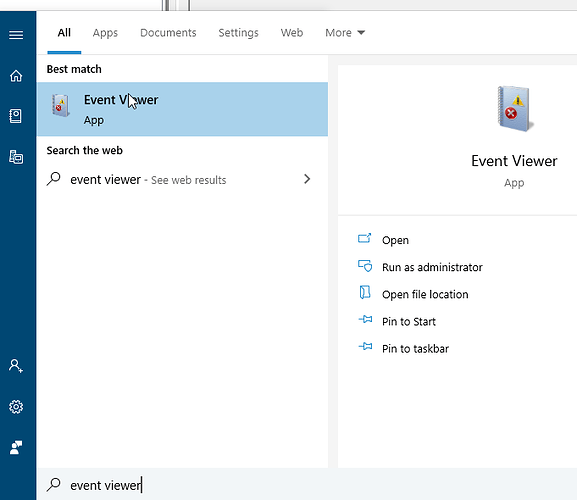
image681×590 19.6 KB
Una vez que se abre Event Viewer, abra la carpeta “WIndows Logs” en el lado izquierdo y seleccione Application (Aplicación).
Ahora, busque en la lista del centro algo etiquetado como “Error” y vea si menciona Paratext.
Este ejemplo muestra un evento de Paratext.
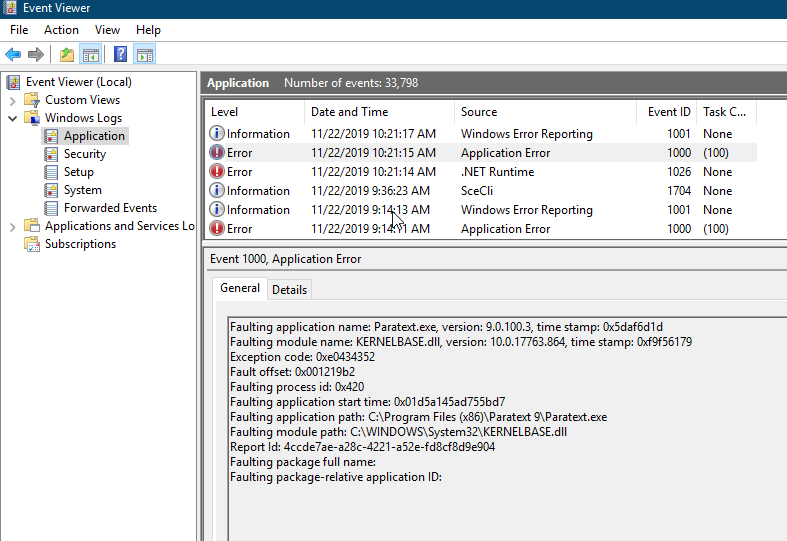
image787×541 32.9 KB
Para copiar la información para enviárnosla, haga clic derecho en el elemento, elija “Copy > Copy details as text” (Copiar > Copiar detalles como texto) y luego pegue eso en su informe de problema.
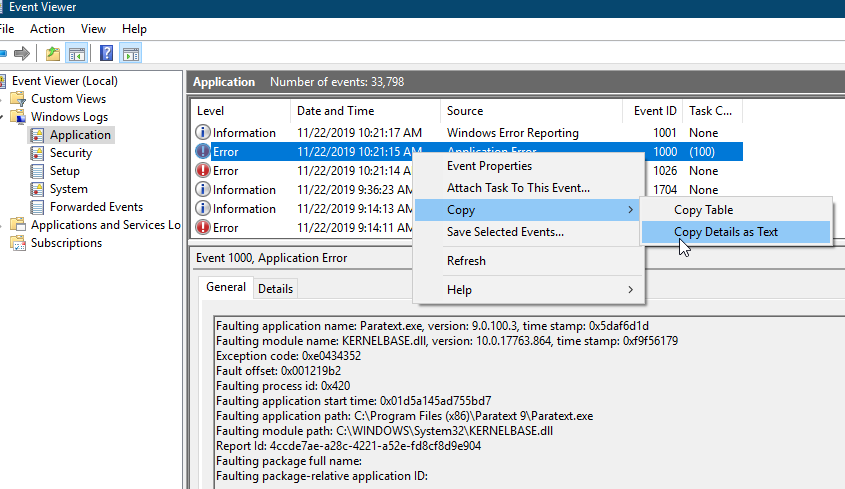
image845×489 34.4 KB
One useful thing in the Give Feedback or Report a Problem dialog is the report includes a Paratext log file which often indicates some more detail about what happened.
But if Paratext suddenly shuts down, or Windows says it has stopped working, if you restart Paratext and submit a problem report, the Paratext log probably will not include the events when Paratext stopped, because it likely exited before it had a change to save the log file.
So if you want to report a crash or sudden exit, here’s how you can give us more technical information.
In Windows, there is a program called Event Viewer. You can search for it in the Start menu.
image681×590 19.6 KB
Once Event viewer opens, open the “WIndows Logs” folder on the left and select Application.
Now look through the list in the middle for something labeled “Error” and see if it mentions Paratext.
This example shows an event from Paratext.
image787×541 32.9 KB
To copy the information to send us, right click on the item, choose “Copy > Copy details as text” then paste that into your problem report.
image845×489 34.4 KB








