0 票
483 次瀏覽

我收到一個請求,需要我們專案的聖經書卷名稱清單。有沒有辦法從「經文參考設定」(Scripture reference settings)中匯出這個清單?在 PT 7 中,我可以複製清單並將其貼上為表格,但在 PT 8 中,我一次只能選擇一個名稱。

機器翻譯自 English
Paratext 由 (175 點) 提出 | 483 次瀏覽

1 個回答

+1 票
最佳回答

I can think of a couple of ways that you could do this:

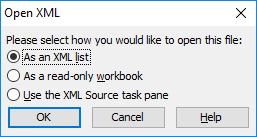
Option 1: Open the BookNames.xml file from your project folder using a right-click and then selecting “Open with…”. Then select Excel (if you have it) and then you might get a dialogue like this:
image
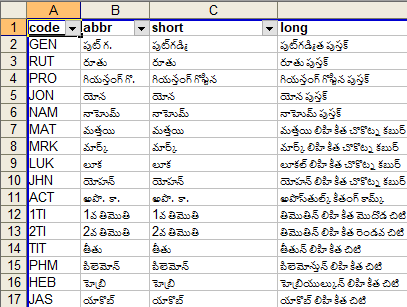
If you pick “As an XML list” then you should end up with a list in Excel that resembles something like this:
image

And you should be able to copy-and-paste whichever column that you need.

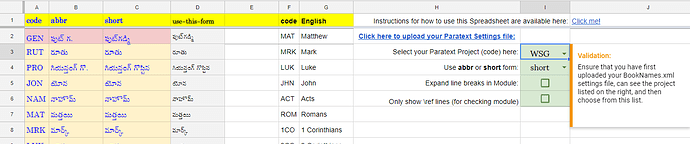
Option 2: I have a tool/process which helps people generate a Topical Index from a Google Spreadsheet. Part of the set-up for that process requires the Paratext book names in a list - so there is a simple way to upload-&-import them into a Google spreadsheet. If you just use steps 2 and 3 from these instructions, then you will get the same information (as above) in the “Start Here” tab of the Google sheet, from where you can copy-and-paste it elsewhere.

舊文章 - 以原文顯示
由 (3.2k 點) 提出
已重新顯示

謝謝你,Mark!這非常有帮助。

機器翻譯自 English

只是想確認一下:您這裡是指 BookNames.xml 嗎?

機器翻譯自 English

謝謝 @anon291708 指出那個錯字。我剛剛已經更新了,以免後來的人被絆倒。

機器翻譯自 English
這在 PT9 中仍然有效嗎?當我嘗試第一個選項,對 .xml 檔案使用「開啟方式」並選擇 Excel 時,我沒有看到對話框,它只是嘗試開啟檔案,然後說它不認識該格式。如果我還是開啟它,它只是 .xml 格式——也就是說,不太易讀/有用。使用 LibreOffice Calc 也是一樣。

選項 2 我得到的是:表單 Upload settings 不再接受回應。
機器翻譯自 English
我自己找到了一個解決方案!為了讓其他人受益:開啟 Libreoffice Calc/Excel。在程式內開啟 BookNames.xml,我得到了一個詢問如何顯示文字的對話框,然後開啟檔案。結果沒有上面顯示的那麼美觀(看起來仍然像 xml),但至少數據是按欄對齊的,並且可以選擇每一欄。

一個外觀更美的版本,如上所示,仍然會很好,但這個是可以使用的。
機器翻譯自 English

相關問題

0 票
2 個回答 487 次瀏覽
When I switch between Find and Replace, RegEx Pal resets the book list to all books. Is this a bug or a feature? If the former, I’ll use Report a Problem.
wdavidhj 1.4k 提出 已提問 9月 6, 2018
0 票
1 個回答 437 次瀏覽
我該如何將目錄(TOC)匯出為清單,而不必逐一複製貼上每個項目?這可行嗎?
Clear7419 251 提出 已提問 8月 30, 2022
0 票
1 個回答 371 次瀏覽
image1552×703 86.2 KB 您好, 我是一個專案的管理員(三個管理員之一),但我無法儲存對「書名」(Book Names)的變更(請參閱附件)。「確定」(OK)按鈕是灰色的。我找不到修改權限以執行此操作的方法。 請注意,該專案的第一位管理員確實擁有此權限。我和另一位指定的管理員則沒有。 解決方案是什麼? 謝謝 anon392948
anon392948 143 提出 已提問 2月 7, 2023
0 票
2 個回答 325 次瀏覽
When you make corrections to \toc headers, the Book Names under Scripture Reference Settings don’t seem to update automatically. Is that by design?
匿名 提出 已提問 4月 10, 2015
+4 票
4 個回答 746 次瀏覽
有人已經建立,或目前正在建立一個自訂的 Biblical Terms Tool(聖經術語工具)清單,其中包含聖經中所有的人名,並將每個人名與舊約和新約中所有包含該人名的經文引用關聯起來嗎? 追蹤在 Major Biblical Terms(主要聖經術語) ... 名的星號標記) 毫無疑問,還有其他我沒想到的問題 但儘管有這些挑戰,我認為這樣的清單會很有幫助
viverechristus 296 提出 已提問 6月 16, 2022
Welcome to Support Bible, where you can ask questions and receive answers from other members of the community.
But if we walk in the light, as he is in the light, we have fellowship with one another, and the blood of Jesus, his Son, purifies us from all sin.
1 John 1:7
3,052 個問題
6,011 個回答
5,677 則評論
2,031 位使用者







