मैं सोच सकता हूँ कि आप इसे करने के लिए कुछ तरीके हैं:
विकल्प 1: अपने परियोजना फोल्डर से BookNames.xml फ़ाइल को राइट-क्लिक करके खोलें और फिर “Open with…” चुनें। फिर Excel चुनें (अगर आपके पास है) और फिर आपको शायद इस तरह का संवाद मिल सकता है:
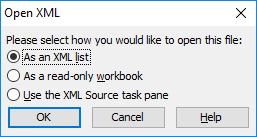
अगर आप “As an XML list” चुनते हैं, तो आपको Excel में इस तरह की सूची मिलनी चाहिए:
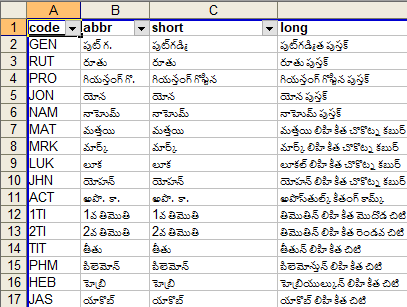
और आपको उस कॉलम को कॉपी-एंड-पेस्ट करने में सक्षम होना चाहिए जिसकी आपको आवश्यकता है।
विकल्प 2: मेरे पास एक टूल/प्रक्रिया है जो लोगों को Google Spreadsheet से एक Topical Index बनाने में मदद करती है। उस प्रक्रिया के सेट-अप का एक हिस्सा Paratext पुस्तक नामों की एक सूची की आवश्यकता रखता है - इसलिए उन्हें Google spreadsheet में अपलोड-एंड-इम्पोर्ट करने का एक सरल तरीका है। अगर आप केवल चरण 2 और 3 का उपयोग करते हैं इन निर्देशों से, तो आपको Google शीट के “Start Here” टैब में वही जानकारी (ऊपर के अनुसार) मिल जाएगी, जहाँ से आप इसे कहीं और कॉपी-एंड-पेस्ट कर सकते हैं।
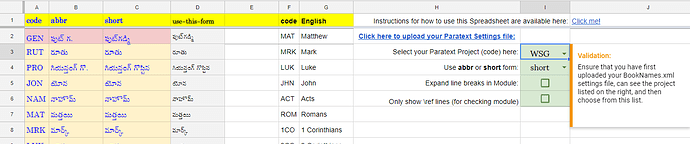
image.png1417×297 38.8 KB

image.png1370×56 12 KB
I can think of a couple of ways that you could do this:
Option 1: Open the BookNames.xml file from your project folder using a right-click and then selecting “Open with…”. Then select Excel (if you have it) and then you might get a dialogue like this:
If you pick “As an XML list” then you should end up with a list in Excel that resembles something like this:
And you should be able to copy-and-paste whichever column that you need.
Option 2: I have a tool/process which helps people generate a Topical Index from a Google Spreadsheet. Part of the set-up for that process requires the Paratext book names in a list - so there is a simple way to upload-&-import them into a Google spreadsheet. If you just use steps 2 and 3 from these instructions, then you will get the same information (as above) in the “Start Here” tab of the Google sheet, from where you can copy-and-paste it elsewhere.
image.png1417×297 38.8 KB
image.png1370×56 12 KB
English से मशीन-अनुवादित








